
About Hillside Dash
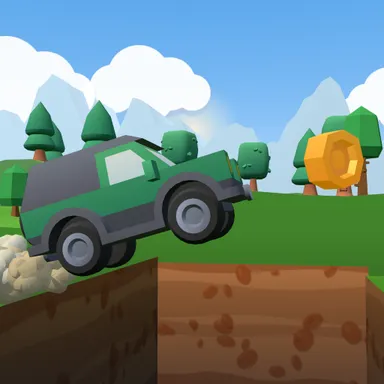
Hillside Dash puts you behind the wheel of a chunky green jeep and sends you bouncing across twenty sunny countryside courses. The road winds over rolling meadows, past pine woods, windmills, cottages and curious farm animals, and every level ends at a chequered finish gate. Hold the gas to climb, ease off before the nose lifts too far, and use the pedals in mid-air to tilt the jeep so you land on all four wheels. The early tracks teach the basics with gentle hills and coin trails, then the countryside starts to play tricks on you: wooden bridges that crumble a moment after you cross, seesaw planks balanced over deep ravines, tumbling crate stacks, little stone stairways, kicker ramps that throw you across gaps and a candy-striped loop-the-loop that needs real speed. Scrape the roof on the ground and the jeep is wrecked, so watch your landings. Finish fast to earn three stars, grab coins along the way and pull off flips for bonus coins. Each course takes well under a minute, retries are instant, and the difficulty rises gently, making this the friendliest place to learn physics driving before you try the tougher worlds.
How to play
Hold → (or the right GAS pedal) to drive and ← (left BRAKE pedal) to brake or reverse. In the air, → tilts the car back and ← tilts it forward — land on your wheels, never on the roof. Reach the finish flag fast for 3 stars.
Controls
| → | Accelerate |
| ← | Brake / reverse |
📺 Play on a TV or projector
- Laptop or PC: connect it to the TV or projector with an HDMI cable (or cast the Chrome tab / mirror your screen), then press the fullscreen button.
- Android TV, Google TV or a TV box: open this site in a browser app on the TV (any Chromium-based TV browser works) and pick a game with the remote's arrows and OK.
- Gamepad: pair a Bluetooth controller (Xbox, PlayStation or a generic one) or plug in a USB one. Stick or D-pad moves, Ⓐ/✕ jumps and selects, Start pauses, View/Select switches fullscreen. In point-and-click games the right stick moves a pointer and RT clicks.
- Phone or tablet: mirror or cast your screen to the TV, or open the site in the TV's own browser.
Difficulty: ★☆☆☆☆ · Released: 2026-10-07