
About Banana Kart Cup
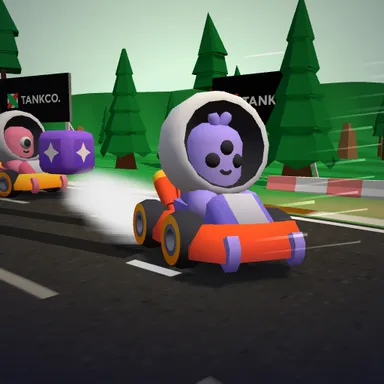
Banana Kart Cup is a cheerful go-kart party where a band of little alien drivers race wheel to wheel and nobody plays fair. Rows of purple item boxes float above the track; drive through one and you might pull a nitro canister for a sudden burst of speed, a banana peel to drop right in the path of whoever is tailgating you, or a shower of bonus coins. The rivals grab boxes too, so watch the road for yellow peels after a crowded corner, and keep a banana in your pocket when someone is breathing down your neck. Every kart can drift: hold the button while you steer into a bend, keep the slide going until the sparks glow blue, then orange, then purple, and let go to rocket out with a mini-turbo. Seventeen cups of racing visit sunny beaches, shady pine woods, a dusty desert, a snowy mountain pass, a red canyon, a slippery glacier and a glowing neon city, each one later driven backwards with a tougher pack, including a desert run after dark. Grab the podium to move on and chase three stars on every race.
How to play
Hold ↑ to drive and ← → to steer. Hold Space while turning to drift and release for a mini-turbo. Drive through item boxes, then press E to use your item: nitro, a banana to drop behind you, or coins. Phones: auto gas, ◀ ▶ steer, DRIFT and ITEM buttons.
Controls
| ↑ | Accelerate |
| Arrow keys | Steer |
| Space | Drift |
| ↓ | Brake / reverse |
📺 Play on a TV or projector
- Laptop or PC: connect it to the TV or projector with an HDMI cable (or cast the Chrome tab / mirror your screen), then press the fullscreen button.
- Android TV, Google TV or a TV box: open this site in a browser app on the TV (any Chromium-based TV browser works) and pick a game with the remote's arrows and OK.
- Gamepad: pair a Bluetooth controller (Xbox, PlayStation or a generic one) or plug in a USB one. Stick or D-pad moves, Ⓐ/✕ jumps and selects, Start pauses, View/Select switches fullscreen. In point-and-click games the right stick moves a pointer and RT clicks.
- Phone or tablet: mirror or cast your screen to the TV, or open the site in the TV's own browser.
Difficulty: ★★☆☆☆ · Released: 2026-10-07