
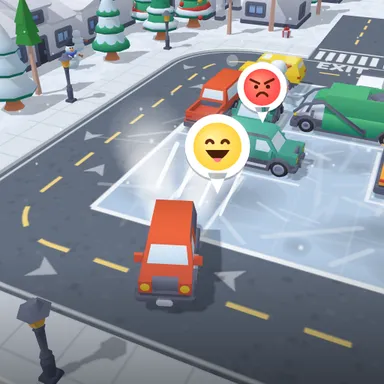
About Icy Lot Slide
Overnight snow turned the ski resort car park into a skating rink. On this glassy surface nobody can reverse: every car only drives forward, the way its nose points, and once you push it, it glides along its lane until it either slides straight out onto the ploughed ring road or thumps into whatever is in the way, and then it stays right where it stopped. That changes everything. Sometimes the only way to free a buried car is to nudge a neighbour forward a few bays first, and a careless swipe can park an SUV across the only open lane and freeze the whole lot. Snow piles and snowmen sit between the rows and catch sliding cars, which you can use on purpose to line a car up. A solver finds the fewest moves for every lot and the counter shows that par next to your total. If you get stuck, Undo rewinds your last slide and Restart resets the lot. Snow keeps falling, pedestrians in winter coats wander the sidewalk, and the barrier gate waits at the top of the hill. Match par on all fifty frosty lots to collect every star.
How to play
Swipe a car toward its nose: cars cannot reverse on ice. It slides until it hits something and stays there, or leaves the lot if the lane is clear. Match the par move count for three stars. Undo and Restart are at the bottom.
Controls
| Drag | Swipe |
| Arrow keys | Move |
📺 Play on a TV or projector
- Laptop or PC: connect it to the TV or projector with an HDMI cable (or cast the Chrome tab / mirror your screen), then press the fullscreen button.
- Android TV, Google TV or a TV box: open this site in a browser app on the TV (any Chromium-based TV browser works) and pick a game with the remote's arrows and OK.
- Gamepad: pair a Bluetooth controller (Xbox, PlayStation or a generic one) or plug in a USB one. Stick or D-pad moves, Ⓐ/✕ jumps and selects, Start pauses, View/Select switches fullscreen. In point-and-click games the right stick moves a pointer and RT clicks.
- Phone or tablet: mirror or cast your screen to the TV, or open the site in the TV's own browser.
Difficulty: ★★★★☆ · Released: 2026-10-07