
About Timber Toss
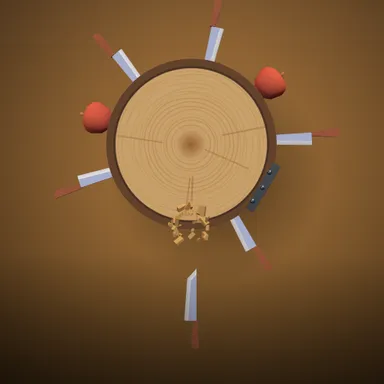
Timber Toss is a one-tap throwing game about timing and nerve. A thick oak round spins in front of a warm workshop wall, and a chef's knife waits at the bottom of the screen. Tap, click or press Space and the knife flies straight up and thunks into the wood wherever the round happens to be facing at that moment. Every stage asks you to land a set number of knives, shown as a column of blades in the corner, and the round shatters into flying wedges the moment the last one sticks. The catch is simple and brutal: if a knife hits another knife, it bounces off with a clang and the run is over. Early rounds turn slowly and politely, but each new stage spins faster and flips direction, and soon the wood starts to sweep back and forth, stop dead, or speed up and snap back, so you have to read its rhythm instead of just waiting for a gap. Some rounds arrive with knives already buried in them, and iron bands bolted to the rim will knock away anything that hits them. Red apples perched on the edge are worth five bonus points, every fifth clean hit in a row adds a combo bonus, and every fifth stage is a reinforced boss round. How far can you carve?
How to play
Tap, click or press Space to throw. Land the required number of knives on the spinning round without touching another knife or an iron band. Hit apples for bonus points.
Controls
| Click / TapSpace | Throw |
📺 Play on a TV or projector
- Laptop or PC: connect it to the TV or projector with an HDMI cable (or cast the Chrome tab / mirror your screen), then press the fullscreen button.
- Android TV, Google TV or a TV box: open this site in a browser app on the TV (any Chromium-based TV browser works) and pick a game with the remote's arrows and OK.
- Gamepad: pair a Bluetooth controller (Xbox, PlayStation or a generic one) or plug in a USB one. Stick or D-pad moves, Ⓐ/✕ jumps and selects, Start pauses, View/Select switches fullscreen. In point-and-click games the right stick moves a pointer and RT clicks.
- Phone or tablet: mirror or cast your screen to the TV, or open the site in the TV's own browser.
Difficulty: ★★★☆☆ · Released: 2026-10-08