
About Barnyard Hop
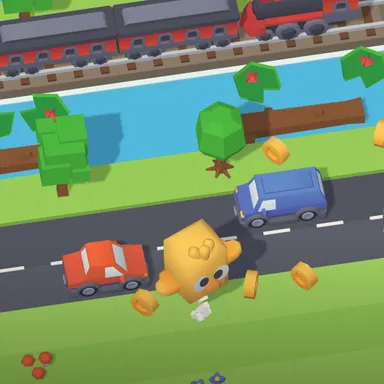
Barnyard Hop drops a plucky little chick at the edge of a sunny farm and asks one simple question: how far can you get? Every tap is one hop forward across a patchwork of green meadows, busy country roads, lazy rivers and railway tracks. Tractors rumble past, pickup trucks race delivery vans, and the faster lanes get busier the farther you travel. Rivers are where things get tricky: drifting logs carry you sideways, and still lily-pad lanes ask you to pick the right stepping stone before you jump. Railway crossings flash red and ring their bell a moment before a long train thunders through, so listen as well as look. Trees, rocks and stumps block some tiles, which means you will sometimes need to step left or right to find a gap. Do not dawdle, though: the camera slowly creeps ahead, and if you hang around too long a hungry eagle swoops down and carries you off. Grab shiny coins along the way, beat your top distance and watch the whole countryside come alive in bright, chunky toy-box colours. It takes one second to learn and a long time to master.
How to play
Tap, click or press Space / ↑ to hop forward. Swipe or use ← → ↓ (A D S) to step aside or back. Dodge cars and trains, ride logs across rivers and keep moving before the eagle comes.
Controls
| Click / TapSpace | Jump |
| Arrow keysW A S D | Move |
| Drag | Swipe |
📺 Play on a TV or projector
- Laptop or PC: connect it to the TV or projector with an HDMI cable (or cast the Chrome tab / mirror your screen), then press the fullscreen button.
- Android TV, Google TV or a TV box: open this site in a browser app on the TV (any Chromium-based TV browser works) and pick a game with the remote's arrows and OK.
- Gamepad: pair a Bluetooth controller (Xbox, PlayStation or a generic one) or plug in a USB one. Stick or D-pad moves, Ⓐ/✕ jumps and selects, Start pauses, View/Select switches fullscreen. In point-and-click games the right stick moves a pointer and RT clicks.
- Phone or tablet: mirror or cast your screen to the TV, or open the site in the TV's own browser.
Difficulty: ★★☆☆☆ · Released: 2026-10-06