
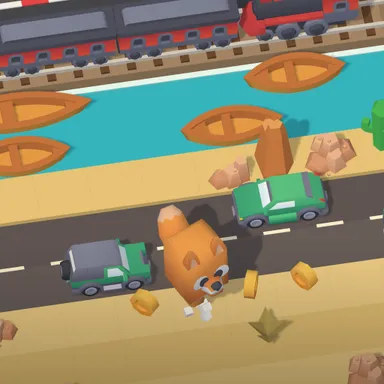
About Canyon Fox Run
Canyon Fox Run takes the hop-and-dodge formula deep into a sun-baked red-rock canyon. Towering cliff walls frame both sides of the path, cacti and sandstone spires block the way, and the desert highways are anything but empty. The star attraction is the race strip: striped tarmac lanes where Formula-style race cars scream through at blistering speed. You will never outrun them, but you can read them. Checkered flags start waving and amber lamps flash just before each car arrives, and sometimes two cars come in a row, so wait for the second one before you jump. Between the race strips you cross dusty highways full of pickups, flatbed trucks and sports hatchbacks, and the odd oasis river where long canoes drift past and carry you sideways. Freight trains still run through the canyon with flashing signals and bells. This is the fastest and toughest crossing of the set: traffic ramps up quickly, the camera pushes on at a brisk pace and the eagle loses patience sooner. Collect coins, chase a new best and prove your fox is the quickest critter in the canyon.
How to play
Tap, click or press Space / ↑ to hop; swipe or use ← → ↓ to step aside. On race strips, wait while the flags wave and the amber lamps flash: a race car is coming, sometimes two.
Controls
| Click / TapSpace | Jump |
| Arrow keysW A S D | Move |
| Drag | Swipe |
📺 Play on a TV or projector
- Laptop or PC: connect it to the TV or projector with an HDMI cable (or cast the Chrome tab / mirror your screen), then press the fullscreen button.
- Android TV, Google TV or a TV box: open this site in a browser app on the TV (any Chromium-based TV browser works) and pick a game with the remote's arrows and OK.
- Gamepad: pair a Bluetooth controller (Xbox, PlayStation or a generic one) or plug in a USB one. Stick or D-pad moves, Ⓐ/✕ jumps and selects, Start pauses, View/Select switches fullscreen. In point-and-click games the right stick moves a pointer and RT clicks.
- Phone or tablet: mirror or cast your screen to the TV, or open the site in the TV's own browser.
Difficulty: ★★★★☆ · Released: 2026-10-06