
About Moon Orb Rush
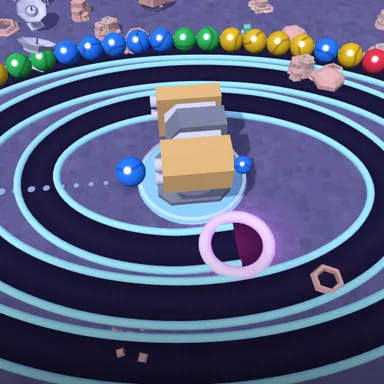
Moon Orb Rush is the endless survival mode of the marble-chain shooter, played on a purple moon base among craters, crystal rocks, satellite dishes and a curious astronaut. A twin-barrel turret in the middle of the board fires orbs into a chain that never stops coming. Make groups of three or more to clear them, close gaps with matching colors for combos and grab the power orbs that slow the chain, push it backward or blow a hole in it. The catch is that the chain speeds up the longer you survive, and new colors join the mix every forty-five seconds, starting with four and growing to six. There is no finish line: the run ends when an orb rolls into the glowing pit, and your score is everything you cleared on the way. Each of the six arenas has its own track shape and a target score; reach the target to clear the arena and unlock the next one, and beat it by a wide margin to earn up to three stars. Shots are fast, combos stack quickly and the danger meter pulses red when the chain gets close, so stay calm, plan swaps ahead and see how long you can hold out.
How to play
Aim and tap to fire orbs, match three or more to clear them. The chain never ends and keeps speeding up; reach the arena's target score before an orb rolls into the pit.
Controls
| Mouse | Aim |
| Click / Tap | Shoot |
| Space | Swap |
📺 Play on a TV or projector
- Laptop or PC: connect it to the TV or projector with an HDMI cable (or cast the Chrome tab / mirror your screen), then press the fullscreen button.
- Android TV, Google TV or a TV box: open this site in a browser app on the TV (any Chromium-based TV browser works) and pick a game with the remote's arrows and OK.
- Gamepad: pair a Bluetooth controller (Xbox, PlayStation or a generic one) or plug in a USB one. Stick or D-pad moves, Ⓐ/✕ jumps and selects, Start pauses, View/Select switches fullscreen. In point-and-click games the right stick moves a pointer and RT clicks.
- Phone or tablet: mirror or cast your screen to the TV, or open the site in the TV's own browser.
Difficulty: ★★★★☆ · Released: 2026-10-08