
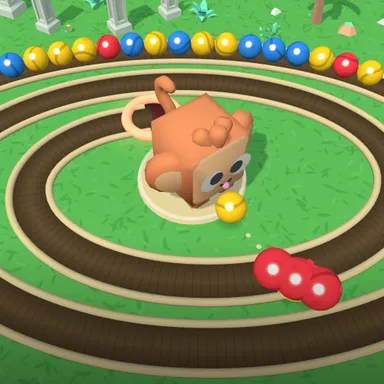
About Monkey Orb Spiral
Monkey Orb Spiral is a 3D marble-chain shooter set in sunny jungle ruins. A long line of glossy colored orbs rolls along a carved stone groove toward a glowing pit, and a cheeky cube monkey standing on a stone dais in the middle of the board is your only defense. Aim anywhere and tap or click to spit an orb into the chain. Land it next to two or more orbs of the same color and the group bursts apart. When the gap closes and the two ends match, the front of the chain is pulled back and snaps together for a chain-reaction combo that multiplies your score. The monkey always holds the current orb in front and the next orb behind it; tap the monkey, press Space or right-click to swap them when the next color fits better. Every level starts with a fast roll-in and then slows down, so the first seconds are your chance to plan. Fifty-six levels in three sets, each starting gentle and ending tense, mix spirals, snaking switchbacks, waves and horseshoe tracks, add up to six colors and lengthen the chain as you progress, and your star rating depends on how close the chain came to the pit. Clear the whole chain to win, keep it far from the hole for three stars, and enjoy the palm trees, broken columns and flowers that frame every board.
How to play
Aim with the mouse or finger and tap to shoot orbs into the chain. Match three or more of a color, swap orbs by tapping the monkey or pressing Space, and clear the chain before it reaches the pit.
Controls
| Mouse | Aim |
| Click / Tap | Shoot |
| Space | Swap |
📺 Play on a TV or projector
- Laptop or PC: connect it to the TV or projector with an HDMI cable (or cast the Chrome tab / mirror your screen), then press the fullscreen button.
- Android TV, Google TV or a TV box: open this site in a browser app on the TV (any Chromium-based TV browser works) and pick a game with the remote's arrows and OK.
- Gamepad: pair a Bluetooth controller (Xbox, PlayStation or a generic one) or plug in a USB one. Stick or D-pad moves, Ⓐ/✕ jumps and selects, Start pauses, View/Select switches fullscreen. In point-and-click games the right stick moves a pointer and RT clicks.
- Phone or tablet: mirror or cast your screen to the TV, or open the site in the TV's own browser.
Difficulty: ★★☆☆☆ · Released: 2026-10-08