
About Retro Flip Arcade
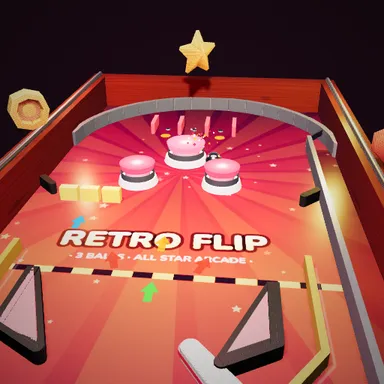
Retro Flip Arcade is a full 3D pinball machine with a seventies arcade soul: a wine-red playfield painted with starbursts, a checkerboard band, chrome rails, glowing pop bumpers and an orange dot-matrix display that shouts every jackpot. The layout is the one from the original game, rebuilt as a real cabinet. Three pop bumpers sit in the middle, a bank of three drop targets waits on the left, three rollover lanes crown the top and two slingshots guard the flippers. Pull back the spring-loaded plunger and fire the steel ball up the shooter lane, around the domed top and into the action. Knock down the whole drop bank for a big bonus and a higher multiplier, clear two banks to unleash multiball, and light all three top lanes for another bump, using the flipper buttons to slide the lit lanes and line up the gap. The ball rolls, spins and reflects the cabinet lights, flippers snap with real momentum, bumpers kick it away with a pop and a flash, and a short ball save after every launch forgives an early drain. You get three balls, and your score earns up to three stars. Play with arrow keys or Z and slash, the left and right mouse halves, or tap each side of your phone.
How to play
Hold Space (or hold the screen) to pull the plunger, release to launch. Left flipper: ← / Z / left half. Right flipper: → / / / right half. Drop all targets for bonuses and multiball, light the top lanes to raise the multiplier.
Controls
| ←→ | Hit |
| Space | Shoot |
| Click / Tap | Tap |
📺 Play on a TV or projector
- Laptop or PC: connect it to the TV or projector with an HDMI cable (or cast the Chrome tab / mirror your screen), then press the fullscreen button.
- Android TV, Google TV or a TV box: open this site in a browser app on the TV (any Chromium-based TV browser works) and pick a game with the remote's arrows and OK.
- Gamepad: pair a Bluetooth controller (Xbox, PlayStation or a generic one) or plug in a USB one. Stick or D-pad moves, Ⓐ/✕ jumps and selects, Start pauses, View/Select switches fullscreen. In point-and-click games the right stick moves a pointer and RT clicks.
- Phone or tablet: mirror or cast your screen to the TV, or open the site in the TV's own browser.
Difficulty: ★★☆☆☆ · Released: 2026-10-08