
About Shield the Pup
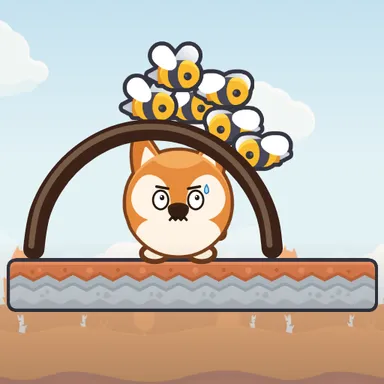
Shield the Pup drops a fluffy orange shiba into an autumn park, right under a buzzing beehive. As soon as you finish drawing, the hive wobbles and an angry swarm pours out, diving straight for the poor puppy. Your only weapon is a single stroke of the pencil. Sketch a dome, a roof, a wall or a cunning hook and it becomes a solid shield the moment you let go, falling and settling under real gravity. Then the countdown starts: keep every stinger away for the full time and the pup wags its tail and grins. Bees shove, bump and probe for gaps, so a shield that wobbles or rolls away will not last, and a line drawn too close can even knock the pup off its ledge. Watch the little face for clues: the pup peeks at your pencil, shivers and sweats as the swarm closes in, and yelps if a bee sneaks through. Forty levels ramp up with two hives at once, narrow ledges, red no-draw zones, slopes that send your shield sliding and longer timers. The ink bar shows three stars, so the tightest, smartest shield scores best. Need a nudge? The light bulb sketches a dotted answer.
How to play
Drag to draw one shield, lift to drop it. Bees attack once you finish; keep them off the pup until the timer ends. Less ink = more stars. Bulb = hint, arrow = restart (R).
Controls
| Drag | Draw |
| R | Restart |
📺 Play on a TV or projector
- Laptop or PC: connect it to the TV or projector with an HDMI cable (or cast the Chrome tab / mirror your screen), then press the fullscreen button.
- Android TV, Google TV or a TV box: open this site in a browser app on the TV (any Chromium-based TV browser works) and pick a game with the remote's arrows and OK.
- Gamepad: pair a Bluetooth controller (Xbox, PlayStation or a generic one) or plug in a USB one. Stick or D-pad moves, Ⓐ/✕ jumps and selects, Start pauses, View/Select switches fullscreen. In point-and-click games the right stick moves a pointer and RT clicks.
- Phone or tablet: mirror or cast your screen to the TV, or open the site in the TV's own browser.
Difficulty: ★★☆☆☆ · Released: 2026-10-07