
About Gridlock Getaway
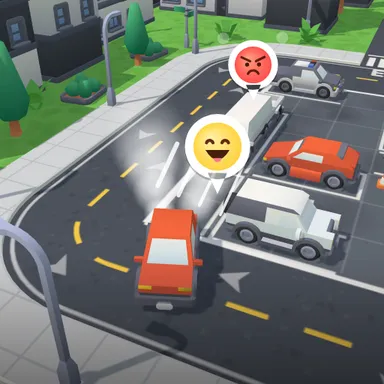
Downtown parking is a disaster and every driver wants to go home at once. Sedans, taxis, police cruisers, delivery vans and a long fire engine are wedged bumper to bumper in a sunny city lot, and only you can sort out who leaves first. Swipe a car forward or backward along its lane: if the way to the ring road is clear it squeals out of its bay, swings onto the road and cruises around to the barrier gate, which lifts with a cheerful ding. If another car is in the way, your driver bumps into it, honks and glares at you with a furious little face before rolling back into the bay. Planter trees and traffic cones in later lots never move, so some cars can only escape in one direction. Pedestrians stroll along the sidewalk and across the exit road, and drivers politely wait for them. A hundred lots, each generated and checked by a solver so every jam can be cleared: the first fifty grow from six cars to thirty, then a second fifty start over with fenced stands, where hazard-striped barriers close off one or two sides, so a car pointing at a fence can only reverse out the other way. Clear a lot with almost no bumps to earn three stars, then try to beat your own record on the harder blocks downtown.
How to play
Swipe a car along its length (forward or back) to drive it out. A car with a clear lane leaves the lot; a blocked one bumps and rolls back. Striped fences close some sides: cars cannot leave through them. Clear every car. Fewer bumps = more stars. Desktop: click a car, then use the arrow keys.
Controls
| Drag | Swipe |
| Arrow keys | Move |
📺 Play on a TV or projector
- Laptop or PC: connect it to the TV or projector with an HDMI cable (or cast the Chrome tab / mirror your screen), then press the fullscreen button.
- Android TV, Google TV or a TV box: open this site in a browser app on the TV (any Chromium-based TV browser works) and pick a game with the remote's arrows and OK.
- Gamepad: pair a Bluetooth controller (Xbox, PlayStation or a generic one) or plug in a USB one. Stick or D-pad moves, Ⓐ/✕ jumps and selects, Start pauses, View/Select switches fullscreen. In point-and-click games the right stick moves a pointer and RT clicks.
- Phone or tablet: mirror or cast your screen to the TV, or open the site in the TV's own browser.
Difficulty: ★★☆☆☆ · Released: 2026-10-07