
About Twisty Tower Rush
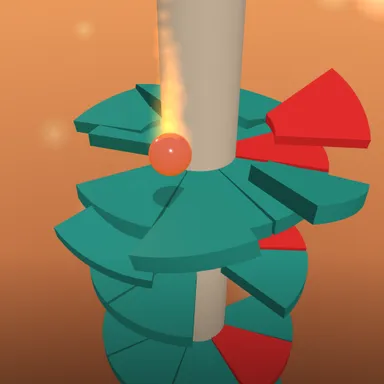
Twisty Tower Rush adds a mischievous twist to the spiral drop: some of the rings turn on their own. The tower rises out of a warm desert dusk in teal, sand and sky-blue rings, and as in any tower drop you drag left or right to spin the whole column and steer a gap under the bouncing ball. But every third ring is loose, slowly rotating by itself, and neighbouring loose rings turn in opposite directions. That means the gap you lined up a moment ago can drift away while the ball is still in the air, and a red wedge can sweep in underneath you, so you have to read where the hole will be when the ball arrives, not where it is now. The tower is endless and uses the medium tuning of the original game, with eight wedges per ring and red pieces that become more common the deeper you dive. Fever is harder to light here, needing four clean drops in a row instead of three, but once lit the ball still smashes through six platforms for bonus points. Score a point for every ring you pass, chase your best dive and learn to time your spins against the twisting rings.
How to play
Drag left or right (or use the arrows) to spin the tower. Every third ring turns by itself, so aim for where the gap will be when the ball lands. Avoid red; four clean drops start fever.
Controls
| Drag←→ | Rotate |
📺 Play on a TV or projector
- Laptop or PC: connect it to the TV or projector with an HDMI cable (or cast the Chrome tab / mirror your screen), then press the fullscreen button.
- Android TV, Google TV or a TV box: open this site in a browser app on the TV (any Chromium-based TV browser works) and pick a game with the remote's arrows and OK.
- Gamepad: pair a Bluetooth controller (Xbox, PlayStation or a generic one) or plug in a USB one. Stick or D-pad moves, Ⓐ/✕ jumps and selects, Start pauses, View/Select switches fullscreen. In point-and-click games the right stick moves a pointer and RT clicks.
- Phone or tablet: mirror or cast your screen to the TV, or open the site in the TV's own browser.
Difficulty: ★★★☆☆ · Released: 2026-10-08