
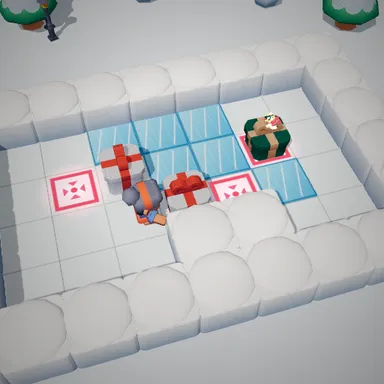
About Frosty Gift Slide
Frosty Gift Slide takes box pushing out into a snowbound winter yard, where wrapped presents must be delivered onto glowing red gift pads before the holiday rush. Most of the ground is packed snow, which behaves exactly as you would expect: push a present and it moves one square. But here and there the yard has frozen into glossy sheets of ice, and anything pushed onto the ice keeps gliding until it bumps into a snowy wall, another present or reaches dry ground on the far side. That one twist turns every puzzle inside out. Ice can carry a gift across the whole yard in a single push, which is wonderful when you planned it and a disaster when you did not, and the trick is often to park a present as a stopper first so the next one halts exactly on its pad. Eighteen levels climb from a single gift on a short patch of ice to four presents sharing frozen lanes, and every one of them was checked by a solver so you know a solution exists. Snow-capped walls, frosted pine trees, lanterns and a snowman decorate the yard. Undo is unlimited, restarting takes one tap, and finishing close to par earns three stars.
How to play
Arrow keys / WASD or swipe to walk and push. Presents pushed onto ice slide until something stops them or they reach snow. Tap a tile to walk there. Get every present onto a red pad. Z = undo, R = restart.
Controls
| Arrow keys | Move |
| W A S D | Move |
| Drag | Swipe |
| Click / Tap | Tap |
📺 Play on a TV or projector
- Laptop or PC: connect it to the TV or projector with an HDMI cable (or cast the Chrome tab / mirror your screen), then press the fullscreen button.
- Android TV, Google TV or a TV box: open this site in a browser app on the TV (any Chromium-based TV browser works) and pick a game with the remote's arrows and OK.
- Gamepad: pair a Bluetooth controller (Xbox, PlayStation or a generic one) or plug in a USB one. Stick or D-pad moves, Ⓐ/✕ jumps and selects, Start pauses, View/Select switches fullscreen. In point-and-click games the right stick moves a pointer and RT clicks.
- Phone or tablet: mirror or cast your screen to the TV, or open the site in the TV's own browser.
Difficulty: ★★★☆☆ · Released: 2026-10-08