
About Dockside Crate Bridge
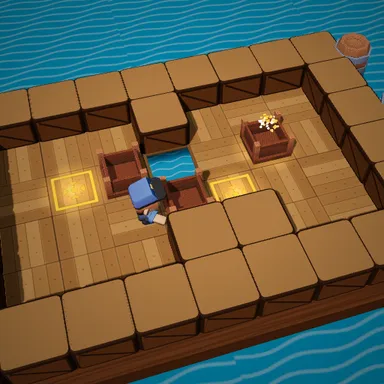
Dockside Crate Bridge sets the puzzle on a sun-bleached wooden pier above a sparkling harbour, with barrels stacked along the edges and a pirate ship riding at anchor offshore. The cargo has to reach the marked spots on the far side of the dock, but the pier is broken: gaps in the planking open straight down to the water, and nobody can walk across them. The only way over is to sacrifice crates. Push a crate into a gap and it drops in with a splash, wedging itself into the hole and turning it into solid footing you can walk over. Every level therefore asks the same delicious question. Which crates become bridges and which ones still need to travel, and in what order? Fill the wrong gap first and the crate you needed is gone. Seventeen levels grow from one gap and one delivery to rows of holes splitting the pier, where the crates you sink and the ones you keep have to be chosen with care. Each layout was checked by a solver, so a clean route always exists, and its best line sets par for three stars. Undo brings a sunk crate straight back out of the water, and restart is a single tap.
How to play
Arrow keys / WASD or swipe to walk and push. Push a crate into a gap to fill it and walk across. Deliver the remaining crates onto the yellow marks. Tap a tile to walk there. Z = undo (even un-sinks a crate), R = restart.
Controls
| Arrow keys | Move |
| W A S D | Move |
| Drag | Swipe |
| Click / Tap | Tap |
📺 Play on a TV or projector
- Laptop or PC: connect it to the TV or projector with an HDMI cable (or cast the Chrome tab / mirror your screen), then press the fullscreen button.
- Android TV, Google TV or a TV box: open this site in a browser app on the TV (any Chromium-based TV browser works) and pick a game with the remote's arrows and OK.
- Gamepad: pair a Bluetooth controller (Xbox, PlayStation or a generic one) or plug in a USB one. Stick or D-pad moves, Ⓐ/✕ jumps and selects, Start pauses, View/Select switches fullscreen. In point-and-click games the right stick moves a pointer and RT clicks.
- Phone or tablet: mirror or cast your screen to the TV, or open the site in the TV's own browser.
Difficulty: ★★★☆☆ · Released: 2026-10-08