
About Toy Block Sorter
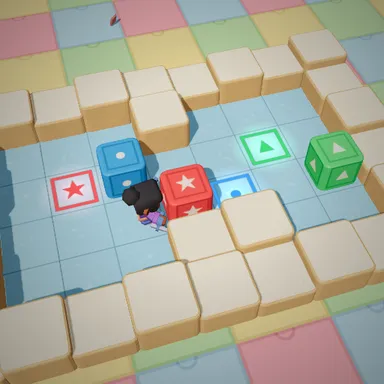
Toy Block Sorter turns a child's playroom floor into a colourful sorting puzzle. Chunky building blocks in red, blue and green, each stamped with a star, a circle or a triangle, are scattered across a sky-blue carpet, and every one has to be pushed onto the matching pad with the same colour and symbol. A box on the wrong colour does not count, so you cannot simply fill the nearest target. You have to untangle which block goes where and in what order, because blocks still obey the classic rule: they can only be pushed, never pulled, and only one at a time. Walls are stacked toy bricks of every colour, a teddy bear and toy racing cars watch from the edges, and the little keeper hums along as blocks thunk into place with a pop of confetti. Eighteen levels start with two blocks and two pads to learn the idea, then grow into crowded rooms where blocks must be shuffled past each other to reach the far side. Every layout has been verified solvable by a computer solver, and par for three stars is set from its best line. Undo is unlimited and restarting is instant, which makes this a friendly brain teaser for kids and a sneaky one for grown-ups.
How to play
Arrow keys / WASD or swipe to walk and push. Each block only counts on the pad with its own colour and symbol. Tap a tile to walk there, tap a block in line to push it. Z = undo, R = restart.
Controls
| Arrow keys | Move |
| W A S D | Move |
| Drag | Swipe |
| Click / Tap | Tap |
📺 Play on a TV or projector
- Laptop or PC: connect it to the TV or projector with an HDMI cable (or cast the Chrome tab / mirror your screen), then press the fullscreen button.
- Android TV, Google TV or a TV box: open this site in a browser app on the TV (any Chromium-based TV browser works) and pick a game with the remote's arrows and OK.
- Gamepad: pair a Bluetooth controller (Xbox, PlayStation or a generic one) or plug in a USB one. Stick or D-pad moves, Ⓐ/✕ jumps and selects, Start pauses, View/Select switches fullscreen. In point-and-click games the right stick moves a pointer and RT clicks.
- Phone or tablet: mirror or cast your screen to the TV, or open the site in the TV's own browser.
Difficulty: ★★★☆☆ · Released: 2026-10-08