
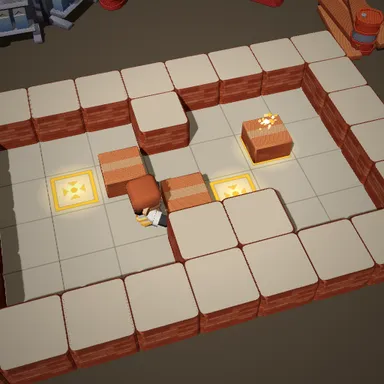
About Crate Keeper Warehouse
Crate Keeper Warehouse is the classic box-pushing puzzle rebuilt as a cosy 3D storehouse: brick walls, a scuffed concrete floor, stacks of shelving and shipping containers out in the yard, and one hard-working keeper in a high-vis vest. Your job sounds easy. Walk the keeper around the grid and shove every cardboard crate onto a glowing yellow pad. The catch is the oldest rule in the genre: crates can only be pushed, never pulled, and only one at a time, so a careless shove into a corner leaves a box stuck for good. That is why undo is unlimited and a restart is always one tap away. The thirty-eight-level campaign opens with the full set from the original game, ordered from a single crate down a corridor to interlocking four-crate depots where the order of your pushes is the whole puzzle, then moves on to eighteen bigger night-shift depots with up to five crates sharing twisting aisles. Every level has a par taken from a solver's optimal line, and finishing near it earns three stars. Steps and pushes animate smoothly, each crate thumps home with a burst of sparks, and the keeper celebrates every cleared floor. Play with arrow keys or WASD, swipe on a phone, or simply tap a tile and the keeper walks there for you.
How to play
Arrow keys / WASD (or swipe) to walk; walk into a crate to push it. Tap a tile to walk there, tap a crate in line to push it. Push every crate onto a glowing pad. Z = undo, R = restart. Fewer moves = more stars.
Controls
| Arrow keys | Move |
| W A S D | Move |
| Drag | Swipe |
| Click / Tap | Tap |
📺 Play on a TV or projector
- Laptop or PC: connect it to the TV or projector with an HDMI cable (or cast the Chrome tab / mirror your screen), then press the fullscreen button.
- Android TV, Google TV or a TV box: open this site in a browser app on the TV (any Chromium-based TV browser works) and pick a game with the remote's arrows and OK.
- Gamepad: pair a Bluetooth controller (Xbox, PlayStation or a generic one) or plug in a USB one. Stick or D-pad moves, Ⓐ/✕ jumps and selects, Start pauses, View/Select switches fullscreen. In point-and-click games the right stick moves a pointer and RT clicks.
- Phone or tablet: mirror or cast your screen to the TV, or open the site in the TV's own browser.
Difficulty: ★☆☆☆☆ · Released: 2026-10-08