
About Moonlight Bubble Climb
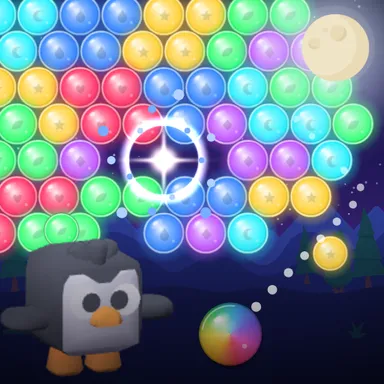
Moonlight Bubble Climb turns the bubble shooter into a night-time ascent. Strings of fairy lights glow across a starry sky, fireflies drift over the pine forest, and above you rises a tower of glowing lantern bubbles far taller than the screen. Your goal on each of the forty levels is to clear the very top row and reach the moon. A sleepy penguin keeps the neon cannon ready while you aim with the dotted guide, bounce shots off the glowing rails and release. Every group of three or more you pop, and every cluster you cut loose, opens the way upward: the camera glides higher as the tower shrinks, revealing the next section to dig through. Bubbles you knock free tumble past the cannon into the buckets below, where the centre pot is worth a thousand points. Bombs hidden in the tower blow open whole pockets, ice-locked lanterns thaw when their neighbours burst, and grey stones have to be dropped or blasted away. Popping charges the power ring for bombs and rainbow bubbles, perfect for the stubborn final rows. Each level has a bubble budget, and when the last top-row lantern falls, the entire tower crashes down in a shower of light and bonus points.
How to play
Aim with the mouse or a finger drag and release to shoot. Pop groups of 3+ and drop clusters to dig upward; clear the top row before your bubbles run out. Tap the next bubble (or press Down) to swap.
Controls
| MouseDrag | Aim |
| Click / TapSpace | Shoot |
| ←→ | Aim |
| ↓ | Swap |
📺 Play on a TV or projector
- Laptop or PC: connect it to the TV or projector with an HDMI cable (or cast the Chrome tab / mirror your screen), then press the fullscreen button.
- Android TV, Google TV or a TV box: open this site in a browser app on the TV (any Chromium-based TV browser works) and pick a game with the remote's arrows and OK.
- Gamepad: pair a Bluetooth controller (Xbox, PlayStation or a generic one) or plug in a USB one. Stick or D-pad moves, Ⓐ/✕ jumps and selects, Start pauses, View/Select switches fullscreen. In point-and-click games the right stick moves a pointer and RT clicks.
- Phone or tablet: mirror or cast your screen to the TV, or open the site in the TV's own browser.
Difficulty: ★★★☆☆ · Released: 2026-10-07