
About Snack Party Match
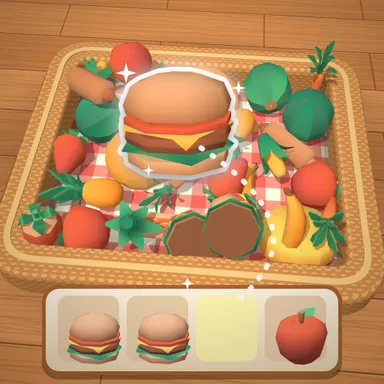
Snack Party Match tips a whole picnic into a wicker basket and asks you to tidy it up before the clock runs out. Burgers, watermelons, pineapples, hot dogs, croissants and crunchy carrots tumble onto a red gingham cloth as real 3D objects that roll, topple and pile on top of each other. Tap any snack to lift it out of the heap and drop it into the seven-slot tray at the bottom of the screen. Three identical snacks in the tray pop away with a satisfying burst, while every other pick takes up precious space. Fill all seven slots without a triple and the party is over, so plan your picks: grab the item you can see twice, dig for the third, and keep an eye on what is hiding under the pile. Matches chained quickly build a combo that multiplies your points, and the time you have left at the end decides how many stars you earn. When the basket gets messy you can undo the last pick, shake everything up, pull a whole triple out with the magnet or buy thirty extra seconds. Forty levels grow from a gentle nine-item snack to a mountain of more than seventy treats with doubles and look-alikes.
How to play
Tap or click a snack to move it into the tray. Collect three of the same snack to clear them. Do not let all seven slots fill up, and clear the basket before the timer ends. Use Undo, Magnet, Shuffle and +Time when you are stuck (keys 1–4); arrow keys and Space also pick items.
Controls
| Click / Tap | Select |
| ←→Space | Select |
| 1234 | Special move |
📺 Play on a TV or projector
- Laptop or PC: connect it to the TV or projector with an HDMI cable (or cast the Chrome tab / mirror your screen), then press the fullscreen button.
- Android TV, Google TV or a TV box: open this site in a browser app on the TV (any Chromium-based TV browser works) and pick a game with the remote's arrows and OK.
- Gamepad: pair a Bluetooth controller (Xbox, PlayStation or a generic one) or plug in a USB one. Stick or D-pad moves, Ⓐ/✕ jumps and selects, Start pauses, View/Select switches fullscreen. In point-and-click games the right stick moves a pointer and RT clicks.
- Phone or tablet: mirror or cast your screen to the TV, or open the site in the TV's own browser.
Difficulty: ★★☆☆☆ · Released: 2026-10-07