
About Autumn Bubble Puzzle
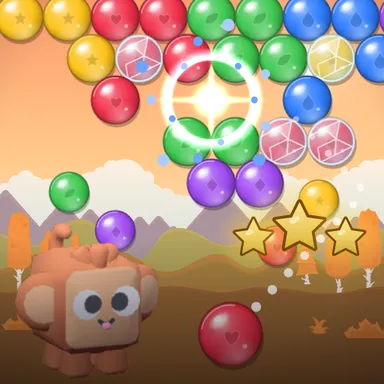
Autumn Bubble Puzzle is a calm, clever bubble shooter for players who like to think before they shoot. Forty compact boards hang from a carved wooden beam while maple leaves drift past an orange forest, and each one asks for the same thing: clear every last bubble with the shots you are given. The boards come in shapes rather than walls of colour. Pyramids, pillars, arches, hearts, hourglasses and narrow bridges all hide a weak point, and hitting the right anchor can send half the puzzle crashing into the buckets in one go. A cheeky monkey mans the cannon, the dotted guide shows the full path including wall bounces, and you can always swap to the next bubble when the colour does not suit the plan. Ice-locked bubbles thaw when a neighbour pops, grey stones refuse to match and must be dropped or blown up, and bombs tucked into the shapes reward precise shots with a big blast. Popping and dropping charges the power ring, which hands you rainbow bubbles and bombs for the stubborn spots. Finish under par for three stars, and any shots left over burst as fireworks for extra points. Every level was played through by our solver, so there is always a way.
How to play
Aim with the mouse or a finger drag and release to shoot. Clear every bubble within the shot limit: pop groups of 3+ and drop whole shapes by breaking their anchors. Tap the next bubble (or press Down) to swap.
Controls
| MouseDrag | Aim |
| Click / TapSpace | Shoot |
| ←→ | Aim |
| ↓ | Swap |
📺 Play on a TV or projector
- Laptop or PC: connect it to the TV or projector with an HDMI cable (or cast the Chrome tab / mirror your screen), then press the fullscreen button.
- Android TV, Google TV or a TV box: open this site in a browser app on the TV (any Chromium-based TV browser works) and pick a game with the remote's arrows and OK.
- Gamepad: pair a Bluetooth controller (Xbox, PlayStation or a generic one) or plug in a USB one. Stick or D-pad moves, Ⓐ/✕ jumps and selects, Start pauses, View/Select switches fullscreen. In point-and-click games the right stick moves a pointer and RT clicks.
- Phone or tablet: mirror or cast your screen to the TV, or open the site in the TV's own browser.
Difficulty: ★★★☆☆ · Released: 2026-10-07