
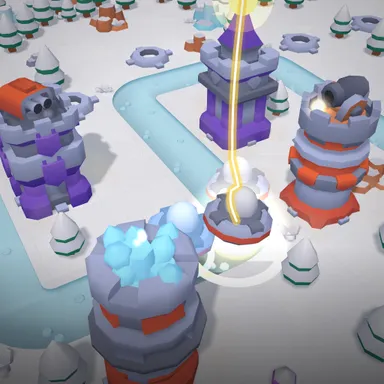
About Snow Pass Stand
Snow Pass Stand moves the saucer invasion into a frozen mountain pass. The road zigzags back and forth across a white valley full of snowy pines, which gives you lots of plots where one tower can cover two stretches of road at once. Snow falls the whole time, but every forty seconds the weather turns nasty: a blizzard roars in, the screen turns pale, and for ten long seconds the invaders ride the wind faster while ordinary towers shoot slower and see less far. Only the frost spires love the storm. They keep their full speed and their slowing ice lasts longer, and on this map they cost a quarter less gold, so building a ring of ice around the switchbacks is the smartest plan. Eighteen waves bring scouts, darts, heavily armoured tanks that shrug off ballista bolts, and saucers that float over the pines. Cannons and tesla coils are your answer to armour, while frost holds everything still long enough to be destroyed. Watch the countdown on the red button, call waves early when your defence is ready, and keep the castle gate standing until the storm finally clears and the mothership falls.
How to play
Tap a plot to build, tap a tower to upgrade or sell. Frost spires are cheaper here and keep full power during blizzards, while other towers slow down. Call waves early with the red button. Keys: 1–4 build, U upgrade, S sell, Space next wave, F speed.
Controls
| Click / Tap | Build |
| Space | Select |
| F | Boost |
📺 Play on a TV or projector
- Laptop or PC: connect it to the TV or projector with an HDMI cable (or cast the Chrome tab / mirror your screen), then press the fullscreen button.
- Android TV, Google TV or a TV box: open this site in a browser app on the TV (any Chromium-based TV browser works) and pick a game with the remote's arrows and OK.
- Gamepad: pair a Bluetooth controller (Xbox, PlayStation or a generic one) or plug in a USB one. Stick or D-pad moves, Ⓐ/✕ jumps and selects, Start pauses, View/Select switches fullscreen. In point-and-click games the right stick moves a pointer and RT clicks.
- Phone or tablet: mirror or cast your screen to the TV, or open the site in the TV's own browser.
Difficulty: ★★★☆☆ · Released: 2026-10-06