
About Xiangqi 3D: River Classic
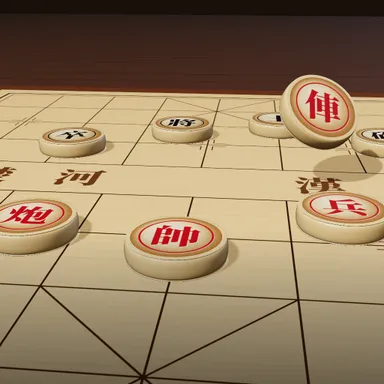
Xiangqi 3D: River Classic brings Chinese chess to a warm boxwood board with ink-drawn lines, the palace diagonals and the river of Chu and Han across the middle. The pieces are thick turned wooden discs with their names carved in red and black, and they click across the points with a satisfying wooden clack. Every traditional rule is enforced: the general and advisors stay inside the palace, elephants never cross the river and can be blocked at the eye, horses are hobbled by a piece at the leg, cannons capture by jumping exactly one screen, soldiers gain sideways steps once they cross, and the two generals may never face each other on an open file. Checkmate wins, and so does leaving your opponent without a legal move. Perpetual check is penalised, repetitions are drawn, and sixty moves without a capture end the game. Choose an Easy, Medium or Hard computer opponent and play Red or Black; take back a move, ask for a hint arrow, or offer a draw at any time. The move list uses classic Chinese notation, captured pieces line up beside each player, and your record against each level is kept. Sign in to meet live opponents from the panel below the board.
How to play
Choose a difficulty and a side, then press Play. Tap one of your pieces and then a green dot, or drag the piece onto a point. Red moves first. Checkmate the enemy general — or leave it without a legal move — to win. Undo (U), Hint (H), F flips the board.
Controls
| Click / Tap | Select |
| Drag | Move |
| F | Rotate |
📺 Play on a TV or projector
- Laptop or PC: connect it to the TV or projector with an HDMI cable (or cast the Chrome tab / mirror your screen), then press the fullscreen button.
- Android TV, Google TV or a TV box: open this site in a browser app on the TV (any Chromium-based TV browser works) and pick a game with the remote's arrows and OK.
- Gamepad: pair a Bluetooth controller (Xbox, PlayStation or a generic one) or plug in a USB one. Stick or D-pad moves, Ⓐ/✕ jumps and selects, Start pauses, View/Select switches fullscreen. In point-and-click games the right stick moves a pointer and RT clicks.
- Phone or tablet: mirror or cast your screen to the TV, or open the site in the TV's own browser.
Difficulty: ★★★☆☆ · Released: 2026-10-07