
About Fuse Box Blocks
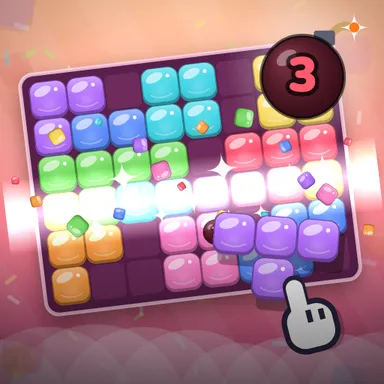
Fuse Box Blocks takes the sweet, jelly-candy block puzzle and lights a fuse under it. Play starts like any calm grid game: drag pieces from the tray, complete rows and columns and pop them in showers of sugar sparkles. But every fifth piece you place, a round black bomb lands on an empty square with a number on it. That number is its fuse, and it ticks down by one every time you place anything. Clear the row or the column the bomb sits in and it is defused for a bonus, with a cheerful pop instead of a bang. Let the counter reach zero and the whole board goes up in smoke, ending the run on the spot. A bomb also takes up a square, so ignoring it slowly chokes the board. The result is a puzzle with two pressures at once: you still need space for awkward pieces, yet you also need to steer your clears toward whichever fuse is burning lowest. When several bombs are on the grid at once, choosing which one to save becomes a real decision. The counter in the side panel shows how many moves remain until the next bomb drops, and fuses glow red in their last three ticks. Stay cool, plan your lines and keep the candy shop in one piece.
How to play
Drag pieces onto the board and fill rows or columns to clear them. Bombs drop every few moves; their number counts down each move. Clear a bomb's row or column before it reaches zero.
Controls
| Drag | Place |
| Click / Tap | Select |
| Arrow keysSpace | Move |
📺 Play on a TV or projector
- Laptop or PC: connect it to the TV or projector with an HDMI cable (or cast the Chrome tab / mirror your screen), then press the fullscreen button.
- Android TV, Google TV or a TV box: open this site in a browser app on the TV (any Chromium-based TV browser works) and pick a game with the remote's arrows and OK.
- Gamepad: pair a Bluetooth controller (Xbox, PlayStation or a generic one) or plug in a USB one. Stick or D-pad moves, Ⓐ/✕ jumps and selects, Start pauses, View/Select switches fullscreen. In point-and-click games the right stick moves a pointer and RT clicks.
- Phone or tablet: mirror or cast your screen to the TV, or open the site in the TV's own browser.
Difficulty: ★★★★☆ · Released: 2026-10-06