
About Beat the Clock Car Park
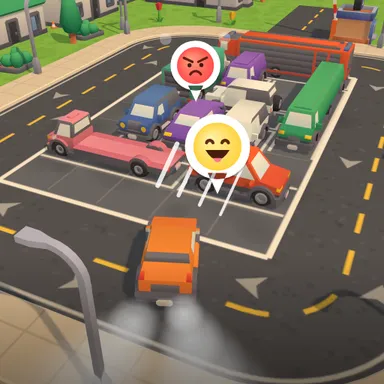
The suburban shopping mall closes in a few minutes and the security guard wants the car park empty before the shutters come down. A countdown clock ticks at the top of the screen while hatchbacks, taxis, pickup trucks and delivery lorries sit jammed between the trolleys and the flower beds. Speed matters here more than perfection: a bump only costs you time, not the level, so fire off swipes as fast as you can read the lanes. Every car that rolls out of the lot adds a precious extra second to the clock, which rewards spotting the free cars quickly and chaining them one after another. The final five seconds tick loudly and the timer flashes red. Drivers on this side of town are in a hurry too and race around the ring road a little faster, braking only for shoppers on the zebra crossing. Fifty lots grow from tiny corner car parks to huge weekend crowds. Finish with lots of time left over to earn three stars.
How to play
Swipe cars forward or back to drive them out before the clock hits zero. Each car that leaves adds a second. Bumps only waste time. More time left = more stars. Desktop: click a car and use the arrow keys.
Controls
| Drag | Swipe |
| Arrow keys | Move |
📺 Play on a TV or projector
- Laptop or PC: connect it to the TV or projector with an HDMI cable (or cast the Chrome tab / mirror your screen), then press the fullscreen button.
- Android TV, Google TV or a TV box: open this site in a browser app on the TV (any Chromium-based TV browser works) and pick a game with the remote's arrows and OK.
- Gamepad: pair a Bluetooth controller (Xbox, PlayStation or a generic one) or plug in a USB one. Stick or D-pad moves, Ⓐ/✕ jumps and selects, Start pauses, View/Select switches fullscreen. In point-and-click games the right stick moves a pointer and RT clicks.
- Phone or tablet: mirror or cast your screen to the TV, or open the site in the TV's own browser.
Difficulty: ★★★☆☆ · Released: 2026-10-07