
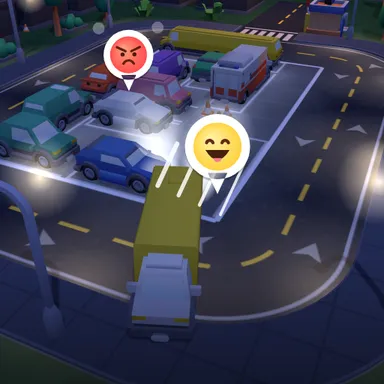
About Midnight Lot Escape
The late show just ended and the residents around this car park are trying to sleep. Headlights sweep across the asphalt, street lamps throw warm pools of light, and the lot is packed with sports coupes, taxis, vans and the odd ambulance on its night shift. Your job is to get everyone out quietly. Every swipe that runs into another car means a honk, and the neighbours only have so much patience: three faces at the top of the screen turn from sleepy yellow to furious red, and the third angry honk ends the level. So look before you swipe. Follow the beams of the headlights to see which way each car points, trace its lane to the edge, and only move the cars whose path is truly empty. Construction lights and cones block a few lanes for good. Fifty lots, all proven solvable, get denser as the night goes on. Clear a lot without a single honk for three stars, and enjoy the peaceful hum of an empty car park when you are done.
How to play
Swipe a car forward or back to drive it out. Each blocked swipe honks and costs one patience face; the third honk loses the lot. Read the headlights to see where cars point. Desktop: click a car and use the arrow keys.
Controls
| Drag | Swipe |
| Arrow keys | Move |
📺 Play on a TV or projector
- Laptop or PC: connect it to the TV or projector with an HDMI cable (or cast the Chrome tab / mirror your screen), then press the fullscreen button.
- Android TV, Google TV or a TV box: open this site in a browser app on the TV (any Chromium-based TV browser works) and pick a game with the remote's arrows and OK.
- Gamepad: pair a Bluetooth controller (Xbox, PlayStation or a generic one) or plug in a USB one. Stick or D-pad moves, Ⓐ/✕ jumps and selects, Start pauses, View/Select switches fullscreen. In point-and-click games the right stick moves a pointer and RT clicks.
- Phone or tablet: mirror or cast your screen to the TV, or open the site in the TV's own browser.
Difficulty: ★★★★☆ · Released: 2026-10-07