
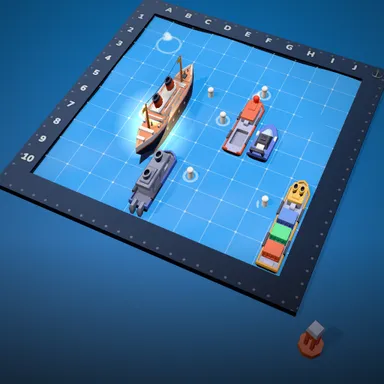
About Fleet Clash: Sea Battle
Fleet Clash: Sea Battle is the classic hidden-fleet guessing duel, staged on two framed ocean grids that rock gently on a bright open sea. First you deploy five toy-like ships on your ten-by-ten grid: an ocean liner five cells long, a container ship of four, two three-cell vessels and a nimble two-cell speedboat. Drag any ship to move it, tap it to turn it, or shuffle for a random layout, then press Ready. Your opponent does the same in secret. Then the camera glides over to the enemy waters and the shooting starts. Pick a square and a shell arcs across the sky: a white peg and a splash mean a miss, a red peg, a fireball and rising smoke mean a hit. Sink a ship and its burning wreck surfaces for everyone to see. Turns alternate, and whoever sinks the whole enemy fleet first wins. When the computer fires back, the view swings home so you can watch your own ships take the hits. Easy shoots at random, Medium hunts around every hit, and Hard keeps a probability map of where your remaining ships can still be hiding. Ask for a hint at any time, and sign in to battle friends or quick-match players online.
How to play
Deploy: drag ships to move them, tap a ship to turn it, Shuffle for a random layout, then Ready. Battle: click or tap a square of the enemy waters to fire (tap twice on phones). Red peg = hit, white = miss. Sink all five ships to win. Hint (H).
Controls
| Click / Tap | Shoot |
📺 Play on a TV or projector
- Laptop or PC: connect it to the TV or projector with an HDMI cable (or cast the Chrome tab / mirror your screen), then press the fullscreen button.
- Android TV, Google TV or a TV box: open this site in a browser app on the TV (any Chromium-based TV browser works) and pick a game with the remote's arrows and OK.
- Gamepad: pair a Bluetooth controller (Xbox, PlayStation or a generic one) or plug in a USB one. Stick or D-pad moves, Ⓐ/✕ jumps and selects, Start pauses, View/Select switches fullscreen. In point-and-click games the right stick moves a pointer and RT clicks.
- Phone or tablet: mirror or cast your screen to the TV, or open the site in the TV's own browser.
Difficulty: ★★☆☆☆ · Released: 2026-10-07