
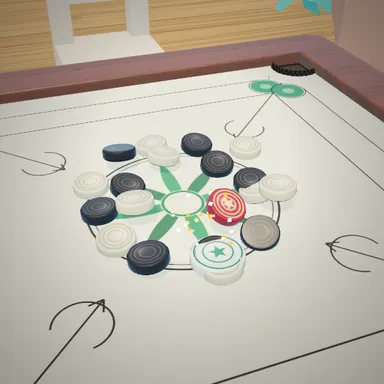
About Garden Doubles Carrom
Garden Doubles Carrom moves the board out onto a sunny wooden veranda, ringed by oak trees, flower pots and a low picket fence, and fills all four sides with players. This is carrom the way families play it on long afternoons: two teams, partners sitting opposite each other, the turn passing round the board anticlockwise. Your side shoots the light coins and so does your partner across the board, so every flick can set up their next shot or wreck your rivals' plans. Play with a CPU partner against two computer opponents, or seat four people round one phone or laptop for a full doubles match. The classic rules stay intact: the red queen must be covered with one of your team's coins, a pocketed striker is a foul that costs a coin, and clearing your team's colour wins. Seated characters cheer good pots and shake their heads at blunders, and confetti flies on a win. Play it online too: Quick Match, a private room or a friend invite seats four real players round the board, partners opposite, two against two. Everyone sees the board from their own edge and watches each player flick in real time, and all four screens run the very same physics. Wait for friends to fill the table, or press Start with AI to let the CPU take the empty seats; if a player drops out, or sits idle for 25 seconds, the CPU flicks for them. The winning team earns points.
How to play
Slide your striker with the bar (or ← →), aim with the mouse, pull back and release to flick (or hold Space). Touch: drag back on the board and let go. Partners sit opposite and share a colour; turns pass anticlockwise. Clear your team's coins and cover the queen. Online: use Quick Match, a room or a friend invite on the game page; wait for the table to fill (or press Start with AI), and play from your own edge; you have 25 seconds per shot before the CPU flicks for you.
Controls
| Drag | Aim and shoot |
| Mouse | Aim |
| Arrow keys | Move |
| Space | Shoot |
📺 Play on a TV or projector
- Laptop or PC: connect it to the TV or projector with an HDMI cable (or cast the Chrome tab / mirror your screen), then press the fullscreen button.
- Android TV, Google TV or a TV box: open this site in a browser app on the TV (any Chromium-based TV browser works) and pick a game with the remote's arrows and OK.
- Gamepad: pair a Bluetooth controller (Xbox, PlayStation or a generic one) or plug in a USB one. Stick or D-pad moves, Ⓐ/✕ jumps and selects, Start pauses, View/Select switches fullscreen. In point-and-click games the right stick moves a pointer and RT clicks.
- Phone or tablet: mirror or cast your screen to the TV, or open the site in the TV's own browser.
Difficulty: ★★★☆☆ · Released: 2026-10-08