
About Fuse Box Panic
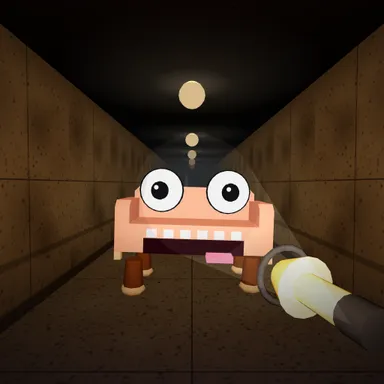
Fuse Box Panic drops you into a blacked-out building where the power has failed and a grumpy living sofa has the run of the place. Every floor has a breaker box and a handful of glowing fuses scattered through the maze. Grab the fuses, carry them back, and plug them in: with each one the lights flicker back on a little more, the humming returns, and the exit sign finally turns green. Until then you are mostly in the dark, so your flashlight and a few spare batteries are your best friends. Couchzilla stomps around on stubby legs with a huge toothy grin and eyes the size of dinner plates. It bounces after you, crouches for a moment, then pounces. Step aside at the last second and it crashes into the wall and sees stars. Hide in lockers or under desks, throw squeaky toys to lure it off, and save your stamina for the long straight halls. Fifteen levels take you through a boiler basement, offices, a moon base, a supermarket, a pool, a kitchen, a library and an arcade. Earn stars for restoring power, finding the notes and being quick.
How to play
Keyboard: WASD or the arrow keys walk, the mouse looks (click the game once to capture it, dragging also works), hold Shift to run, F toggles the flashlight, E or Space hides and steps out again, Q throws a squeaky toy. Touch: left stick walks (push it all the way to run), drag the right side to look, ✋ hides or comes out, 🔦 is the flashlight, 🐥 throws a toy. Pick up the glowing fuses and walk up to the breaker box to plug them in, then run for the exit once the power is back.
Controls
| W A S DArrow keys | Move |
| Mouse | Rotate |
| Space | Interact |
📺 Play on a TV or projector
- Laptop or PC: connect it to the TV or projector with an HDMI cable (or cast the Chrome tab / mirror your screen), then press the fullscreen button.
- Android TV, Google TV or a TV box: open this site in a browser app on the TV (any Chromium-based TV browser works) and pick a game with the remote's arrows and OK.
- Gamepad: pair a Bluetooth controller (Xbox, PlayStation or a generic one) or plug in a USB one. Stick or D-pad moves, Ⓐ/✕ jumps and selects, Start pauses, View/Select switches fullscreen. In point-and-click games the right stick moves a pointer and RT clicks.
- Phone or tablet: mirror or cast your screen to the TV, or open the site in the TV's own browser.
Difficulty: ★★★★☆ · Released: 2026-10-08