
About Cube Island Nights
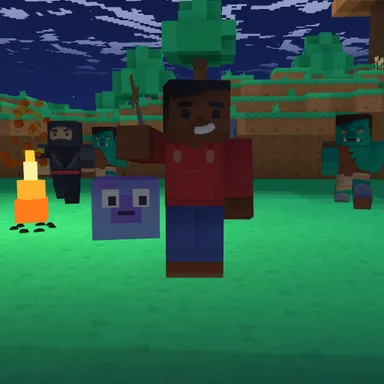
Cube Island Nights is a blocky survival adventure on your very own island in the sea. When the sun is up you are free to explore: chop trees for logs, turn them into planks and sticks, build a workbench and craft your first wooden pickaxe. Dig into the hills for cobblestone, coal, iron and rare sparkling gems, and use them to make stronger tools and swords. Every block you break or place stays where you left it, because your island is saved on your device. But keep an eye on the clock. When the sky turns orange, night is coming, and with it a crowd of silly troublemakers: grumpy green Grumblins, wobbly jelly cubes, speedy Sneaks and clanking robots. Build a shelter, light a campfire to keep them away, and bonk anything that gets too close until the sun rises again. Thirty nights get a little harder each time, then a second pack of thirty frostbite nights starts the climb again with shorter days, longer nights and tougher monsters. Every day comes with a quest such as crafting a pickaxe, collecting coal or building a wall. Survive the night, finish the quest and keep half of your hearts to earn all three stars. Cute animals wander the meadows by day, and getting knocked out never costs you your stuff, so younger players can try again right away.
How to play
Move with WASD or the stick, jump with Space. Hold left click or ⛏ to mine, right click or ■ to place, E or the hammer to craft. Survive each night until sunrise.
Controls
| W A S D | Move |
| Space | Jump |
| Mouse | Aim |
| Left click | Swing |
| Right click | Place |
| E | Interact |
📺 Play on a TV or projector
- Laptop or PC: connect it to the TV or projector with an HDMI cable (or cast the Chrome tab / mirror your screen), then press the fullscreen button.
- Android TV, Google TV or a TV box: open this site in a browser app on the TV (any Chromium-based TV browser works) and pick a game with the remote's arrows and OK.
- Gamepad: pair a Bluetooth controller (Xbox, PlayStation or a generic one) or plug in a USB one. Stick or D-pad moves, Ⓐ/✕ jumps and selects, Start pauses, View/Select switches fullscreen. In point-and-click games the right stick moves a pointer and RT clicks.
- Phone or tablet: mirror or cast your screen to the TV, or open the site in the TV's own browser.
Difficulty: ★★☆☆☆ · Released: 2026-10-08