
About Blueprint Builders
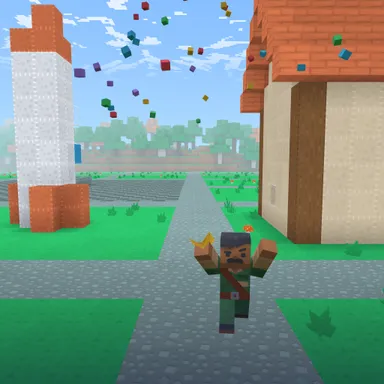
Blueprint Builders is a relaxing block building game where every level adds a new landmark to your growing town. A glowing blueprint appears on an empty plot, showing exactly which block goes where. Fly around the ghost outline and fill it in piece by piece: aim at a glowing spot and the right block is picked for you, so you can focus on the fun of watching walls rise, roofs close and windows sparkle. Blocks that still float in the air wait faintly until something holds them up, which makes every build a gentle lesson in building from the ground up. Thirty blueprints grow from a tiny fire pit and a pixel heart to a lighthouse, a rocket, a pirate ship, a ferris wheel, a giant birthday cake and finally a full castle with four towers. Finish a build and fireworks burst over the plot, then the new structure stays in the town for good, so the streets around the fountain plaza fill up as you play. Quick placements build a combo, and a timer awards up to three stars for speedy builders. Infinite blocks, no danger and free flight make it perfect for younger players and anyone who loves to build. Online, build together with up to three friends in a quick match or a private room: the whole squad works on the same blueprint in one shared town, anyone can place or remove blocks, a shared progress bar fills up, and finishing the build is a team win. Empty seats are friendly AI helpers.
How to play
Fly with WASD + Space / Shift (or the stick and ▲ ▼). Aim at a glowing ghost block and click or tap ■ to place it. Fill the whole blueprint. Online, press Quick match or Create room; click a glowing block to place it, Ctrl+click to remove one.
Controls
| W A S D | Move |
| Space | Jump |
| Mouse | Aim |
| Left click | Swing |
| Right click | Place |
| E | Interact |
📺 Play on a TV or projector
- Laptop or PC: connect it to the TV or projector with an HDMI cable (or cast the Chrome tab / mirror your screen), then press the fullscreen button.
- Android TV, Google TV or a TV box: open this site in a browser app on the TV (any Chromium-based TV browser works) and pick a game with the remote's arrows and OK.
- Gamepad: pair a Bluetooth controller (Xbox, PlayStation or a generic one) or plug in a USB one. Stick or D-pad moves, Ⓐ/✕ jumps and selects, Start pauses, View/Select switches fullscreen. In point-and-click games the right stick moves a pointer and RT clicks.
- Phone or tablet: mirror or cast your screen to the TV, or open the site in the TV's own browser.
Difficulty: ★☆☆☆☆ · Released: 2026-10-08