
About Spoon Tunnel Noob
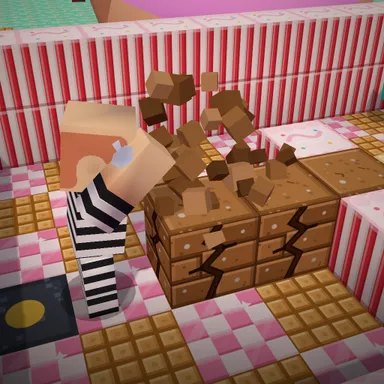
Spoon Tunnel Noob turns the oldest prison trick into a full puzzle game. You start every level already holding the legendary spoon, and the whole prison is packed with crumbly cracked walls waiting to be scraped open. Walk into a cracked block, hold on for a moment while dirt chunks fly, and a brand new tunnel appears. The best part is that guards cannot see into tunnels, so a freshly dug corridor is a safe highway right through the middle of a flashlight-filled room. The catch is time: each block takes a second to dig, so you must plan where to start digging, when to peek out and which wall to carve next while the patrols swing back and forth. Sixteen levels visit the Cartoon Jail, Candy Castle, Space Station and Pirate Ship, mixing thick dirt walls, vents, bars you can look through but not walk through, levers and coloured keys. Collect all three coins for a second star, and never get caught for the third. If a guard does spot you, he simply carries you back to the start with a big grin. Wear the black and white striped suit, grab the spoon, and dig your way to freedom, one silly scoop at a time.
How to play
Move with W A S D or the arrow keys (on a phone: drag the on-screen stick) and press Space (or the JUMP button) to leap over gaps. You already have the spoon: walk into a cracked wall and keep pushing for a moment to dig a tunnel. Guards cannot see you inside tunnels or vents.
Controls
| W A S DArrow keys | Move |
| Space | Jump |
📺 Play on a TV or projector
- Laptop or PC: connect it to the TV or projector with an HDMI cable (or cast the Chrome tab / mirror your screen), then press the fullscreen button.
- Android TV, Google TV or a TV box: open this site in a browser app on the TV (any Chromium-based TV browser works) and pick a game with the remote's arrows and OK.
- Gamepad: pair a Bluetooth controller (Xbox, PlayStation or a generic one) or plug in a USB one. Stick or D-pad moves, Ⓐ/✕ jumps and selects, Start pauses, View/Select switches fullscreen. In point-and-click games the right stick moves a pointer and RT clicks.
- Phone or tablet: mirror or cast your screen to the TV, or open the site in the TV's own browser.
Difficulty: ★★★☆☆ · Released: 2026-10-08