
About Buzzlight Halls
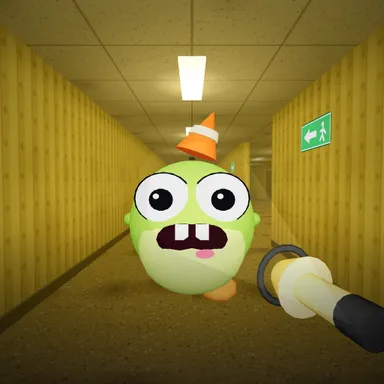
Buzzlight Halls is a spooky-but-silly maze escape for brave kids. You wake up in endless yellow corridors with damp carpet, buzzing fluorescent lights and doors that lead nowhere. The only way out is a glowing exit door at the far end of the floor, and it stays locked until you find every key hidden in the maze. Wander the halls with your flashlight, but watch the battery: the beam makes monsters notice you from farther away, and the dark corners are very dark. Gloop, a wobbly green blob in a traffic cone hat with enormous googly eyes, patrols the halls making blorping noises. If it spots you it gives chase, though it trips over cardboard boxes and slips in puddles. Duck into a locker or under a desk, toss a squeaky toy to send it the wrong way, or sprint while your stamina lasts. Each of the fifteen levels has its own look, from yellow wallpaper halls to cubicle offices, glowing pool rooms, a midnight supermarket, a playground, a neon arcade, a boiler room and a snowy lobby. Collect hidden notes for silly jokes, earn up to three stars per level for escaping, finding every note and beating the par time, and learn the maze before the lights go out.
How to play
Keyboard: WASD or the arrow keys walk, the mouse looks (click the game once to capture the mouse, dragging also works), hold Shift to run, F toggles the flashlight, E or Space hides in a locker or under a desk and steps back out, Q throws a squeaky toy. Touch: drag the left stick to walk (push it all the way to run), drag the right side of the screen to look, tap ✋ to hide or come out, 🔦 for the flashlight, 🐥 to throw a squeaky toy. Collect every key, then reach the glowing exit door.
Controls
| W A S DArrow keys | Move |
| Mouse | Rotate |
| Space | Interact |
📺 Play on a TV or projector
- Laptop or PC: connect it to the TV or projector with an HDMI cable (or cast the Chrome tab / mirror your screen), then press the fullscreen button.
- Android TV, Google TV or a TV box: open this site in a browser app on the TV (any Chromium-based TV browser works) and pick a game with the remote's arrows and OK.
- Gamepad: pair a Bluetooth controller (Xbox, PlayStation or a generic one) or plug in a USB one. Stick or D-pad moves, Ⓐ/✕ jumps and selects, Start pauses, View/Select switches fullscreen. In point-and-click games the right stick moves a pointer and RT clicks.
- Phone or tablet: mirror or cast your screen to the TV, or open the site in the TV's own browser.
Difficulty: ★★★☆☆ · Released: 2026-10-08