
About Corner Pocket: Eight-Ball Lounge
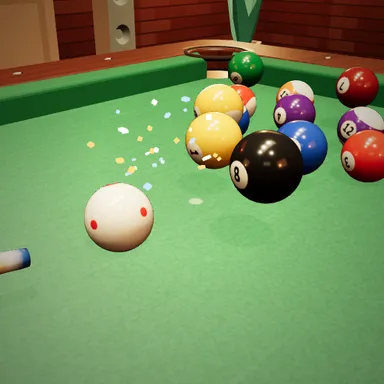
Corner Pocket: Eight-Ball Lounge puts a full-size, glossy pool table under a warm three-shade lamp in a cosy brick-walled bar, and asks the oldest question in billiards: can you clear your group and drop the black before your rival does? The physics feel like the real thing. A centre-ball hit slides before it starts to roll, a stun shot parks the cue ball dead on a full contact, top spin follows through and back spin draws it home, while side english widens or tightens the angle off every cushion. Pick a CPU opponent on Easy, Medium or Hard - the hard player actually simulates its options before it shoots and plays position like a hustler - or hand the mouse across the sofa for a two-player match on the same device. The rules are proper eight-ball: an open table until the first legal pot, solids against stripes, your own group must be hit first, a ball must reach a rail after contact, and every foul hands your opponent ball-in-hand anywhere on the cloth. Sink the 8 early or scratch on it and the frame is gone. A clear aim line shows the ghost ball, the object ball's path and where the cue ball will deflect, so newcomers can learn the angles while experts dial in spin and pace. Big breaks shake the room, doubles pop on screen and the person across the table reacts to every miss.
How to play
Move the mouse to aim, then press, pull back and release to strike (or hold Space and release). Touch: drag on the table to aim and pull the power bar, or drag back from the cue ball like a slingshot. Set spin on the cue-ball widget (WASD). Pot your group, then the 8.
Controls
| Mouse | Aim |
| Drag | Shoot |
| Arrow keys | Aim |
| Space | Shoot |
📺 Play on a TV or projector
- Laptop or PC: connect it to the TV or projector with an HDMI cable (or cast the Chrome tab / mirror your screen), then press the fullscreen button.
- Android TV, Google TV or a TV box: open this site in a browser app on the TV (any Chromium-based TV browser works) and pick a game with the remote's arrows and OK.
- Gamepad: pair a Bluetooth controller (Xbox, PlayStation or a generic one) or plug in a USB one. Stick or D-pad moves, Ⓐ/✕ jumps and selects, Start pauses, View/Select switches fullscreen. In point-and-click games the right stick moves a pointer and RT clicks.
- Phone or tablet: mirror or cast your screen to the TV, or open the site in the TV's own browser.
Difficulty: ★★☆☆☆ · Released: 2026-10-07