
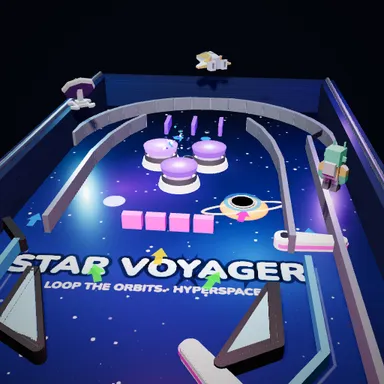
About Star Voyager Pinball
Star Voyager Pinball sends the steel ball on a deep-space mission across a midnight-blue playfield full of nebulae, a ringed planet and a scatter of glittering stars. A sleek spaceship model, a satellite dish and a curious little alien keep watch from the corners of the cabinet, and the cyan dot-matrix display tracks every manoeuvre. This table is built around flow. Two orbit lanes wrap around the left and right edges of the machine, so a clean flipper shot sends the ball racing all the way round the top and back down the other side; chain loops together and the combo value climbs with every lap. Three loops light HYPERSPACE, and sinking the ball into the saucer while it is lit pays a twenty-five thousand point jackpot and launches an extra ball. An upper flipper on the right lets skilled players feed the left orbit directly, a four-target drop bank sits in the middle for bonuses and multiball, and three pop bumpers keep things lively. You get three balls with a ball save after each launch, and your final score is rated with up to three stars.
How to play
Hold Space or the screen to pull the plunger, release to launch. ← / Z or the left half flips left; → / / or the right half flips right (and the upper flipper). Loop the orbits 3 times, then sink the saucer for HYPERSPACE.
Controls
| ←→ | Hit |
| Space | Shoot |
| Click / Tap | Tap |
📺 Play on a TV or projector
- Laptop or PC: connect it to the TV or projector with an HDMI cable (or cast the Chrome tab / mirror your screen), then press the fullscreen button.
- Android TV, Google TV or a TV box: open this site in a browser app on the TV (any Chromium-based TV browser works) and pick a game with the remote's arrows and OK.
- Gamepad: pair a Bluetooth controller (Xbox, PlayStation or a generic one) or plug in a USB one. Stick or D-pad moves, Ⓐ/✕ jumps and selects, Start pauses, View/Select switches fullscreen. In point-and-click games the right stick moves a pointer and RT clicks.
- Phone or tablet: mirror or cast your screen to the TV, or open the site in the TV's own browser.
Difficulty: ★★★☆☆ · Released: 2026-10-08