
About Royal Flick Carrom
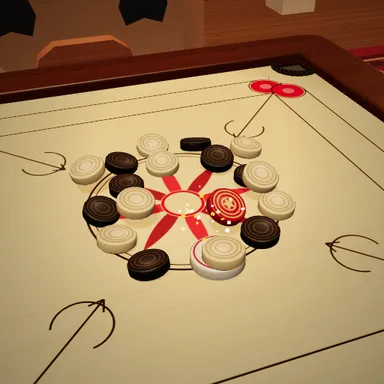
Royal Flick Carrom sets a gleaming birch-ply board on a carved stand in a warm, lamp-lit parlour. Slide your striker along the baseline, drag back like a slingshot and let it fly into the rack: coins clack apart, rattle off the hardwood frame and drop into the corner nets. You play the light coins, your rival plays the dark ones, and whoever clears their colour first takes the match. The red queen is the prize everyone wants, but it only counts once you cover it by sinking one of your own coins on the same stroke or the next; miss the cover and it slides back to the centre. Pocket the striker and you foul, handing back a coin and the turn. Face a CPU on Easy, Medium or Hard, where the toughest player tests its options before every flick, or share the device for a two-player duel with the camera swinging round to whoever is shooting. A clear guide shows where the striker meets a coin and which way it runs. Play it online too: Quick Match, a private room or a friend invite seats you across the board from a real opponent. Everyone sees the board from their own side and watches the other player line up and flick in real time, and both screens run the very same physics, so every shot lands alike. Wait for a friend, or press Start with AI to let the CPU take the empty seat; if a player drops out, or sits idle for 25 seconds, the CPU flicks for them. The winner earns points.
How to play
Drag the slider (or ← →) to place your striker on the baseline. Aim with the mouse, then press, pull back and release to flick (or hold Space). Touch: drag back anywhere on the board like a slingshot and let go. Pot all your light coins and cover the queen. Online: use Quick Match, a room or a friend invite on the game page, wait for an opponent (or press Start with AI), and play from your own side of the board; you have 25 seconds per shot before the CPU flicks for you.
Controls
| Drag | Aim and shoot |
| Mouse | Aim |
| Arrow keys | Move |
| Space | Shoot |
📺 Play on a TV or projector
- Laptop or PC: connect it to the TV or projector with an HDMI cable (or cast the Chrome tab / mirror your screen), then press the fullscreen button.
- Android TV, Google TV or a TV box: open this site in a browser app on the TV (any Chromium-based TV browser works) and pick a game with the remote's arrows and OK.
- Gamepad: pair a Bluetooth controller (Xbox, PlayStation or a generic one) or plug in a USB one. Stick or D-pad moves, Ⓐ/✕ jumps and selects, Start pauses, View/Select switches fullscreen. In point-and-click games the right stick moves a pointer and RT clicks.
- Phone or tablet: mirror or cast your screen to the TV, or open the site in the TV's own browser.
Difficulty: ★★☆☆☆ · Released: 2026-10-08