
About Sugar Rush Sabotage
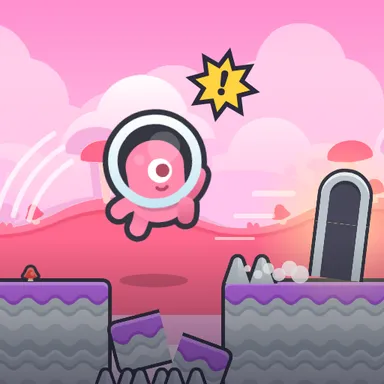
Sugar Rush Sabotage takes place in a pastel world of pink frosting cliffs, giant toadstools and a sky the colour of strawberry milk, and it gives you something the other worlds do not: a double jump. Press jump once to leave the ground and again in mid-air to soar higher, then bounce off bright blue springs that launch you over towering walls of candy. It feels wonderful for about four seconds. Then the level starts using your new powers against you. Your second jump summons an invisible block right above your head, springs fling you up into icing spikes that were not there a moment ago, the floating sugar platform you landed on melts away, the exit door hops from ledge to ledge to stay out of reach and gravity turns upside down at the top of a big bounce. Each of the twenty-five sweet little levels is a single screen with one or two mean surprises, and every death puts you straight back at the start with the trap now burned into your memory. Learn when to save your double jump, when to bounce and when to simply walk. Clear a level without dying to collect three stars and prove you cannot be fooled twice.
How to play
Arrow keys or A/D to move. Press Space, W or up to jump and press it again in mid-air for a double jump. Blue springs fling you sky-high. On phones use the ◀ ▶ pads and the jump button (tap twice to double jump). Reach the door; expect the candy to cheat.
Controls
| ←→ | Move |
| Space↑ | Jump |
| R | Restart |
📺 Play on a TV or projector
- Laptop or PC: connect it to the TV or projector with an HDMI cable (or cast the Chrome tab / mirror your screen), then press the fullscreen button.
- Android TV, Google TV or a TV box: open this site in a browser app on the TV (any Chromium-based TV browser works) and pick a game with the remote's arrows and OK.
- Gamepad: pair a Bluetooth controller (Xbox, PlayStation or a generic one) or plug in a USB one. Stick or D-pad moves, Ⓐ/✕ jumps and selects, Start pauses, View/Select switches fullscreen. In point-and-click games the right stick moves a pointer and RT clicks.
- Phone or tablet: mirror or cast your screen to the TV, or open the site in the TV's own browser.
Difficulty: ★★★☆☆ · Released: 2026-10-07