
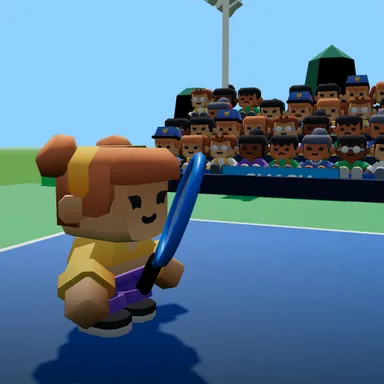
About Ace Court Tour
Ace Court Tour is a bright, quick arcade tennis season played on a blue hard court in a sunny stadium full of cheering fans. You control the footwork and the game takes care of the swing: run to the ball and your player strikes it automatically the moment it is in reach. Where you meet the ball decides where it goes, so getting there early and stepping to the side sends sharp angles across the court, while holding left or right as you hit lets you aim at the open corner on purpose. A glowing marker shows where every shot will land, which makes reading the bounce easy for new players but still leaves plenty to master. Twelve rivals wait on the tour, from a sleepy club player who misses half his returns to a fast, far-reaching champion who rarely makes mistakes and always aims away from you. Early matches are a single game, later ones are first to two or three games with real tennis scoring: fifteen, thirty, forty, deuce and advantage. Win without dropping a game to earn three stars, collect them all, and hear the crowd roar for every ace and winner you hit. Want a human rival instead of the tour? Play online: Quick Match, a private room or a friend invite sets up a one-on-one match against a real opponent. You always play from the bottom of your own screen, the AI plays any empty seat, and the first player to three games wins and earns points for the leaderboard.
How to play
Run with WASD or the arrow keys, or drag on the court to run there. Swings are automatic when the ball is in reach. Hold left or right while hitting to aim at a corner. The glowing ring shows where the ball will land. For an online 1v1, pick Quick Match, Create room or Invite a friend on the game page: first to three games wins.
Controls
| W A S D | Move |
| Drag | Move |
| Arrow keys | Aim |
📺 Play on a TV or projector
- Laptop or PC: connect it to the TV or projector with an HDMI cable (or cast the Chrome tab / mirror your screen), then press the fullscreen button.
- Android TV, Google TV or a TV box: open this site in a browser app on the TV (any Chromium-based TV browser works) and pick a game with the remote's arrows and OK.
- Gamepad: pair a Bluetooth controller (Xbox, PlayStation or a generic one) or plug in a USB one. Stick or D-pad moves, Ⓐ/✕ jumps and selects, Start pauses, View/Select switches fullscreen. In point-and-click games the right stick moves a pointer and RT clicks.
- Phone or tablet: mirror or cast your screen to the TV, or open the site in the TV's own browser.
Difficulty: ★★☆☆☆ · Released: 2026-10-08