
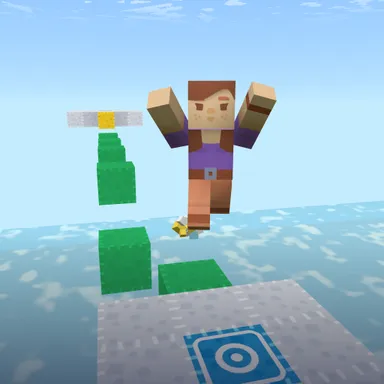
About Block Hop Parkour
Block Hop Parkour is a bright 3D jumping course built from rainbow blocks floating high above a sparkling sea. Run along wool paths, leap from pillar to pillar and race toward the golden trophy waiting at the end of every stage. Thirty stages introduce a new trick one at a time (a second pack of thirty lava-heavy stages follows for the brave): diagonal zigzag jumps, rows of lava you must hop over, springy green bounce blocks that fling you up to the next level, ladders to climb, slippery ice runways and big drops onto tiny targets. Blue checkpoint pads save your progress, so a missed jump only sends you back a few blocks, and floating islands with trees drift around the course to make every stage feel like its own little world. A timer shows which star rating you are still on track for, the progress bar marks every checkpoint, and gold coins along the best line reward clean runs. The camera follows behind your blocky runner and you can switch to a first person view at any time for precise jumps. On a phone you steer with a thumb stick and jump with one big button, on a computer you use WASD or the arrow keys and Space. Stages are short, so one more try always fits. Online, race up to three friends in a quick match or a private room: everyone runs the same course at once, the other racers appear as blocky runners with name tags, a live leaderboard shows who is ahead, and the finish order decides the winner. Empty seats race as AI runners.
How to play
Run with WASD / arrows or the stick, jump with Space or ▲. Touch blue checkpoints, avoid lava and reach the trophy. V switches the camera. Online, press Quick match or Create room and race the others to the trophy.
Controls
| W A S D | Move |
| Space | Jump |
| Mouse | Aim |
| Left click | Swing |
| Right click | Place |
| E | Interact |
📺 Play on a TV or projector
- Laptop or PC: connect it to the TV or projector with an HDMI cable (or cast the Chrome tab / mirror your screen), then press the fullscreen button.
- Android TV, Google TV or a TV box: open this site in a browser app on the TV (any Chromium-based TV browser works) and pick a game with the remote's arrows and OK.
- Gamepad: pair a Bluetooth controller (Xbox, PlayStation or a generic one) or plug in a USB one. Stick or D-pad moves, Ⓐ/✕ jumps and selects, Start pauses, View/Select switches fullscreen. In point-and-click games the right stick moves a pointer and RT clicks.
- Phone or tablet: mirror or cast your screen to the TV, or open the site in the TV's own browser.
Difficulty: ★★☆☆☆ · Released: 2026-10-08