
About Carrom Trick Academy
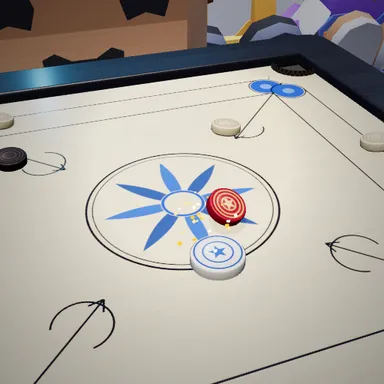
Carrom Trick Academy is a solo puzzle course for anyone who wants to master the flick. Each of the sixteen lessons sets a hand-checked arrangement of coins on a tournament board in a grand blue hall, with a seated crowd watching from the benches and a championship banner glowing on the wall. Your job is to sink every light coin, and the red queen when she appears, using only the strikes you are given. Dark coins are blockers: knock one into a pocket and it costs you an extra strike, as does losing the striker into a net. The early lessons are straight pots that teach you how pull distance turns into pace. Then come thin cuts into the corners, banks off the frame when the direct line is blocked, doubles that drop two coins with one flick and crowded layouts where the order of your shots matters as much as the aim. Every layout was cleared by the game's hardest computer player before it made the syllabus, so each one is genuinely solvable, and finishing on or under par earns three stars. The aim guide marks the coin you will hit and its path, a pulsing ring highlights every coin you still need, and the crowd roars when the last one drops.
How to play
Slide the striker (bar or ← →), aim with the mouse, pull back and release (or hold Space). Touch: drag back on the board and let go. Pot every ringed light coin (and the queen) within the strikes shown. Dark coins and a pocketed striker cost a strike.
Controls
| Drag | Aim and shoot |
| Mouse | Aim |
| Arrow keys | Move |
| Space | Shoot |
📺 Play on a TV or projector
- Laptop or PC: connect it to the TV or projector with an HDMI cable (or cast the Chrome tab / mirror your screen), then press the fullscreen button.
- Android TV, Google TV or a TV box: open this site in a browser app on the TV (any Chromium-based TV browser works) and pick a game with the remote's arrows and OK.
- Gamepad: pair a Bluetooth controller (Xbox, PlayStation or a generic one) or plug in a USB one. Stick or D-pad moves, Ⓐ/✕ jumps and selects, Start pauses, View/Select switches fullscreen. In point-and-click games the right stick moves a pointer and RT clicks.
- Phone or tablet: mirror or cast your screen to the TV, or open the site in the TV's own browser.
Difficulty: ★★★☆☆ · Released: 2026-10-08