
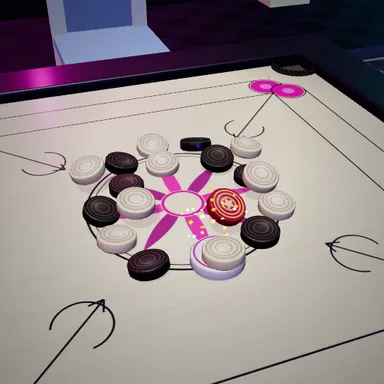
About Neon Points Carrom
Neon Points Carrom turns the lights down, the music up and the rules loose. In this freestyle points race nobody owns a colour: every coin on the board is fair game. Light coins are worth 20, dark coins 10 and the red queen a fat 50, and the first player to reach 160 points wins the night. The board sits under a magenta glow with LED strips round the stand, and the slick, freshly powdered surface lets coins run further than usual, so a well-judged flick can sweep two or three into the nets at once. Sinking any coin earns another shot, so a hot streak can end the game before your rival touches the striker again. Fouls still hurt: pocket the striker and a coin you scored goes back to the centre along with its points. The queen still has to be covered with a following pot. Battle CPU players in a free-for-all, go head to head with a friend, or pass the device round. Play it online too: Quick Match, a private room or a friend invite seats you across the board from a real opponent in a race to the target. Everyone sees the board from their own side and watches the other player flick in real time, and both screens run the very same physics. Wait for a friend, or press Start with AI to let the CPU take the empty seat; if a player drops out, or sits idle for 25 seconds, the CPU flicks for them. The winner earns points.
How to play
Place the striker with the slider (or ← →), aim with the mouse, pull back and release (or hold Space). Touch: drag back on the board and let go. Any coin scores: light 20, dark 10, queen 50 (cover it). First to 160 wins. Online: use Quick Match, a room or a friend invite on the game page, wait for an opponent (or press Start with AI), and play from your own side of the board; you have 25 seconds per shot before the CPU flicks for you.
Controls
| Drag | Aim and shoot |
| Mouse | Aim |
| Arrow keys | Move |
| Space | Shoot |
📺 Play on a TV or projector
- Laptop or PC: connect it to the TV or projector with an HDMI cable (or cast the Chrome tab / mirror your screen), then press the fullscreen button.
- Android TV, Google TV or a TV box: open this site in a browser app on the TV (any Chromium-based TV browser works) and pick a game with the remote's arrows and OK.
- Gamepad: pair a Bluetooth controller (Xbox, PlayStation or a generic one) or plug in a USB one. Stick or D-pad moves, Ⓐ/✕ jumps and selects, Start pauses, View/Select switches fullscreen. In point-and-click games the right stick moves a pointer and RT clicks.
- Phone or tablet: mirror or cast your screen to the TV, or open the site in the TV's own browser.
Difficulty: ★★☆☆☆ · Released: 2026-10-08