
About Trick Shot Academy
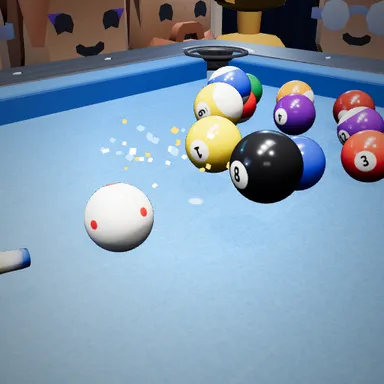
Trick Shot Academy turns the pool table into a puzzle stage. Under bright tournament lights, with a crowd watching from the benches and a trophy waiting on the side table, every level sets up a hand-placed layout and asks you to pot the marked balls within a limited number of shots. The first lessons are gentle: a straight pot into the side pocket, a simple cut into the corner. Then the coach starts testing real cue-ball control. One setup will drag the white straight into the pocket unless you use back spin to stop it, another needs a combination where one ball knocks the next one in, and later racks spread four, five, six and finally seven balls around the table so every shot must also leave a good angle on the next. Glowing rings mark the balls that count, blockers you may ignore sit in your way, and a scratch ends the attempt immediately, so pace matters as much as aim. Clear a layout at or under par for three stars, one shot over for two, and any clearance for one. Fifteen trick shots unlock one after another and you can replay any of them to chase a perfect score. It is the fastest way to master the spin model that powers every other table in the game.
How to play
Pot every ball with a glowing ring before you run out of shots; a scratch fails the trick. Aim with the mouse, pull back and release to shoot, or drag on touch and pull the power bar. Use back spin to stop the cue ball and top spin to follow.
Controls
| Mouse | Aim |
| Drag | Shoot |
| Arrow keys | Aim |
| Space | Shoot |
📺 Play on a TV or projector
- Laptop or PC: connect it to the TV or projector with an HDMI cable (or cast the Chrome tab / mirror your screen), then press the fullscreen button.
- Android TV, Google TV or a TV box: open this site in a browser app on the TV (any Chromium-based TV browser works) and pick a game with the remote's arrows and OK.
- Gamepad: pair a Bluetooth controller (Xbox, PlayStation or a generic one) or plug in a USB one. Stick or D-pad moves, Ⓐ/✕ jumps and selects, Start pauses, View/Select switches fullscreen. In point-and-click games the right stick moves a pointer and RT clicks.
- Phone or tablet: mirror or cast your screen to the TV, or open the site in the TV's own browser.
Difficulty: ★★★☆☆ · Released: 2026-10-07