
About Estate Tycoon: Midnight Auction House
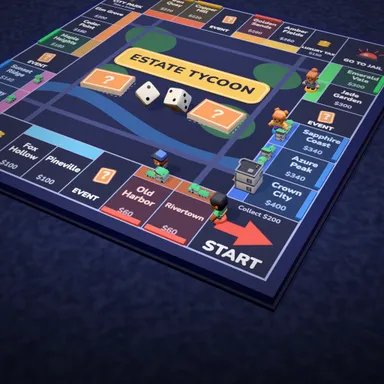
Estate Tycoon: Midnight Auction House plays the property game on a deep navy board lit in gold, with one rule that changes every decision: no street is ever left unsold for long. Whenever a player lands on a street and declines to buy it, or simply cannot afford it, the deed goes straight under the hammer. Every solvent tycoon seals one secret bid at the same moment, nobody sees the numbers until the reveal, and the highest bid takes the street; ties go to the bidder closest to the lander in turn order. That makes cash a weapon. You might let an expensive street go on purpose, hoping to win it later for half the price, or bid high just to stop a rival from completing a colour set. The rest is classic tycoon play: roll the tumbling dice, collect your salary at START, draw event cards, build houses and hotels on complete sets, mortgage when money is tight and offer trades for the one street you are missing. The computer rivals default to Hard, valuing set-completing and set-blocking streets far above their face price. Choose one to three rivals, and the richest player after thirty-six rounds, or the last one standing, wins.
How to play
Roll (Space) and move. On a free street choose Buy or Auction; declined streets are auctioned with one sealed bid per player (use −/+ to set yours). Build on complete colour sets from a street's card, trade by tapping a rival's street. Richest or last solvent wins.
Controls
| Click / Tap | Select |
| Space | Throw |
📺 Play on a TV or projector
- Laptop or PC: connect it to the TV or projector with an HDMI cable (or cast the Chrome tab / mirror your screen), then press the fullscreen button.
- Android TV, Google TV or a TV box: open this site in a browser app on the TV (any Chromium-based TV browser works) and pick a game with the remote's arrows and OK.
- Gamepad: pair a Bluetooth controller (Xbox, PlayStation or a generic one) or plug in a USB one. Stick or D-pad moves, Ⓐ/✕ jumps and selects, Start pauses, View/Select switches fullscreen. In point-and-click games the right stick moves a pointer and RT clicks.
- Phone or tablet: mirror or cast your screen to the TV, or open the site in the TV's own browser.
Difficulty: ★★★☆☆ · Released: 2026-10-07