
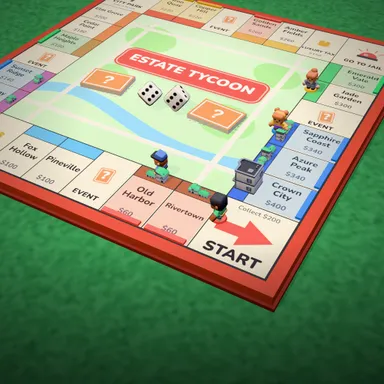
About Estate Tycoon: City Deals
Estate Tycoon: City Deals is a property trading board game for up to four players, played on a bright 3D board around a little city map. Each tycoon is a cheerful character on a coloured base. Roll two real tumbling dice, hop around the twenty-eight tiles and buy the streets you land on. Collect every street of a colour and its rent doubles; then build houses, four of them and finally a hotel tower, and watch rivals pay through the nose when they stop by. Passing START pays a salary, event cards bring dividends, lottery wins, repair bills or a ride straight to jail, and tax offices take their share. Short on cash? Sell houses or mortgage streets, and if that still is not enough you are out of business. Deals make the game: tap any rival's street to offer cash for it, or offer one of yours to the player who needs it most. The last tycoon standing wins, or the richest after forty rounds. Play right away against one, two or three computer rivals on Easy, Medium or Hard; Hard buys to complete sets, blocks yours and haggles hard. Sign in to play friends or quick matches with up to four players online.
How to play
Press Roll (Space) to throw the dice and move. Land on a free street to buy it or pass. Own a full colour set to build houses: tap your street and press Build. Tap any street for its rents; tap a rival's street to make an offer. Last solvent tycoon (or the richest at the round limit) wins.
Controls
| Click / Tap | Select |
| Space | Throw |
📺 Play on a TV or projector
- Laptop or PC: connect it to the TV or projector with an HDMI cable (or cast the Chrome tab / mirror your screen), then press the fullscreen button.
- Android TV, Google TV or a TV box: open this site in a browser app on the TV (any Chromium-based TV browser works) and pick a game with the remote's arrows and OK.
- Gamepad: pair a Bluetooth controller (Xbox, PlayStation or a generic one) or plug in a USB one. Stick or D-pad moves, Ⓐ/✕ jumps and selects, Start pauses, View/Select switches fullscreen. In point-and-click games the right stick moves a pointer and RT clicks.
- Phone or tablet: mirror or cast your screen to the TV, or open the site in the TV's own browser.
Difficulty: ★★☆☆☆ · Released: 2026-10-07