
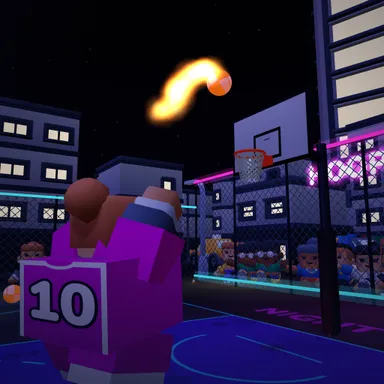
About Neon Night Hoops
Neon Night Hoops is a three point contest on a street court in the middle of the city after dark. Glowing signs buzz on the brick walls, street lamps paint warm pools of light on the asphalt, taxis wait at the kerb and a crowd presses against the chain-link fence to watch. Five ball racks stand around the three point line, from one corner across the top of the key to the other corner, with five balls on each. You have sixty seconds to shoot all twenty-five. Every regular ball is worth one point, and the striped money ball at the end of each rack is worth two. Swipe up to shoot, set the distance with the length of your swipe and the line with its angle, then grab the next ball off the rack and go again. Rhythm is everything: a quick, repeatable motion beats a slow, careful one when the clock is running. Drain three swishes in a row and your ball bursts into flame for double points, and a shot that drops after the buzzer still counts. The first shots show the arc to help you lock in. A perfect rack, a hot hand and a buzzer beater can push your score past twenty for three stars.
How to play
Shoot all five racks around the arc before the clock runs out. Swipe up and release: longer = further, straight = on line. Regular balls score 1, the money ball 2. Keyboard: hold Space to charge, ←/→ to aim.
Controls
| Drag | Swipe |
| Space | Hold |
| ←→ | Aim |
📺 Play on a TV or projector
- Laptop or PC: connect it to the TV or projector with an HDMI cable (or cast the Chrome tab / mirror your screen), then press the fullscreen button.
- Android TV, Google TV or a TV box: open this site in a browser app on the TV (any Chromium-based TV browser works) and pick a game with the remote's arrows and OK.
- Gamepad: pair a Bluetooth controller (Xbox, PlayStation or a generic one) or plug in a USB one. Stick or D-pad moves, Ⓐ/✕ jumps and selects, Start pauses, View/Select switches fullscreen. In point-and-click games the right stick moves a pointer and RT clicks.
- Phone or tablet: mirror or cast your screen to the TV, or open the site in the TV's own browser.
Difficulty: ★★★☆☆ · Released: 2026-10-07