
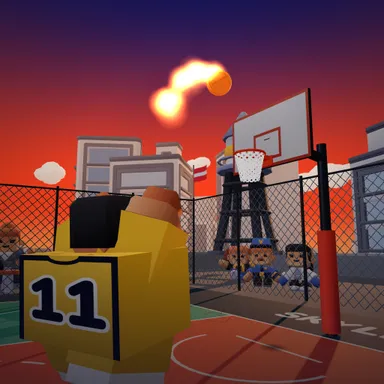
About Rooftop Streak Shootout
Rooftop Streak Shootout is played forty floors above the city at golden hour, on a fenced court painted teal and coral with skyscrapers glowing in the setting sun all around you. The rules could not be simpler and the pressure could not be higher: keep scoring, because a single miss ends the run. Swipe up to shoot, judge the distance with the length of your swipe and keep it straight. After every basket you jog to a new spot, and each one is a little further out and a little wider, from easy close range shots to long threes from the corners. Up here the wind is part of the game. Red flags on the fence posts show which way it blows and the wind gauge tells you how hard, so you will need to aim a touch into it to bring the ball back onto the rim. Swishes keep the fire meter growing, and three in a row set the ball ablaze for double points until the streak finally breaks. Make eight in a row and the hoop itself starts sliding along the fence, so time your release. A handful of neighbours watch from the benches and cheer every bucket. The first two shots show the trajectory to help you warm up. How long can you stay perfect before the sun goes down?
How to play
Swipe up and release to shoot; swipe length sets the power, swipe angle sets the direction. Watch the flags and the wind gauge and aim slightly into the wind. One miss ends the streak. Keyboard: hold Space to charge, ←/→ to aim.
Controls
| Drag | Swipe |
| Space | Hold |
| ←→ | Aim |
📺 Play on a TV or projector
- Laptop or PC: connect it to the TV or projector with an HDMI cable (or cast the Chrome tab / mirror your screen), then press the fullscreen button.
- Android TV, Google TV or a TV box: open this site in a browser app on the TV (any Chromium-based TV browser works) and pick a game with the remote's arrows and OK.
- Gamepad: pair a Bluetooth controller (Xbox, PlayStation or a generic one) or plug in a USB one. Stick or D-pad moves, Ⓐ/✕ jumps and selects, Start pauses, View/Select switches fullscreen. In point-and-click games the right stick moves a pointer and RT clicks.
- Phone or tablet: mirror or cast your screen to the TV, or open the site in the TV's own browser.
Difficulty: ★★★☆☆ · Released: 2026-10-07