
About Rack Attack: Speed Pool
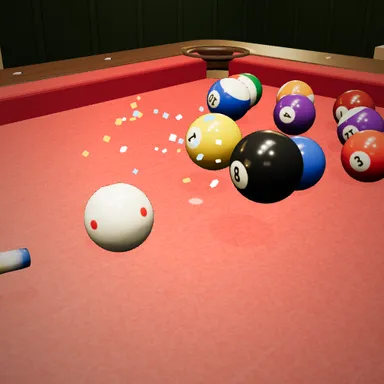
Rack Attack: Speed Pool is a solo sprint on a bright red table in a lively sports bar, with TVs on the panelled walls and a row of bar stools behind you. There is no opponent and no turn to wait for, only you, fifteen balls racked in a triangle and a clock that starts with your first shot. Smash the break, then pot every ball as fast as you can in any order and any pocket you like. Each ball is worth points, and the quicker you clear the table the bigger the time bonus waiting at the end. Rushing has a price though: scratching the cue ball into a pocket adds a ten second penalty and puts the white back on the head spot, so a calm, well-placed shot often beats a wild slam. The full aim guide helps you read cuts quickly, and spin lets you pull the cue ball back for the next pot or roll it forward through a cluster. You have five minutes before the bartender calls time, which is plenty for a tidy run and tense for a messy one. It is the perfect warm-up for the competitive modes, a great way to learn how draw, stun and follow change the leave, and an addictive score chase once you start shaving seconds off your best clearance.
How to play
Pot all fifteen balls in any order before the five-minute limit. Aim with the mouse and pull back to shoot, or drag on touch and use the power bar. A scratch costs ten seconds. Faster clears earn a bigger time bonus.
Controls
| Mouse | Aim |
| Drag | Shoot |
| Arrow keys | Aim |
| Space | Shoot |
📺 Play on a TV or projector
- Laptop or PC: connect it to the TV or projector with an HDMI cable (or cast the Chrome tab / mirror your screen), then press the fullscreen button.
- Android TV, Google TV or a TV box: open this site in a browser app on the TV (any Chromium-based TV browser works) and pick a game with the remote's arrows and OK.
- Gamepad: pair a Bluetooth controller (Xbox, PlayStation or a generic one) or plug in a USB one. Stick or D-pad moves, Ⓐ/✕ jumps and selects, Start pauses, View/Select switches fullscreen. In point-and-click games the right stick moves a pointer and RT clicks.
- Phone or tablet: mirror or cast your screen to the TV, or open the site in the TV's own browser.
Difficulty: ★★☆☆☆ · Released: 2026-10-07