
About Frosty Fairways
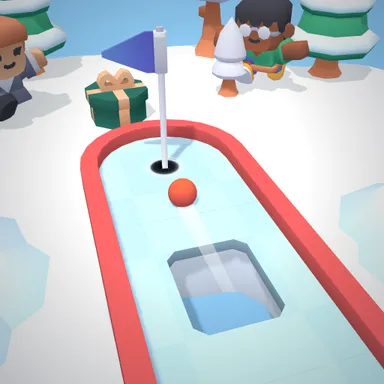
Frosty Fairways is a winter mini golf course where the greens have frozen into slick blue ice and the rails are painted candy red. On ice the ball glides almost forever, so the softest touch travels a long way and a hard putt can bounce around the whole hole before it stops. Soft snow drifts are your friends: roll through one and the ball slows right down, which makes them perfect landing spots in front of the cup. Snowmen stand on the course as round obstacles to curl around, a frozen bowl tries to trap slow balls in its dip, an icy ramp slides weak putts back down to your feet, and a wintry windmill turns slowly across the tunnel. The aiming guide shows two bounces ahead because bank shots off the rails are the secret to this course: aim for the corner, let the ice carry the ball and watch it curl into the cup. Snowy pine trees, presents, sleds and reindeer decorate the island while friendly locals in winter mood cheer every birdie. Nine chilly holes with three stars each, made for players who enjoy finesse and clever angles. Play it online too: Quick Match, a room or a friend invite starts a party round for two to four players, taking turns on the same icy holes with the lowest stroke count winning.
How to play
Drag back to aim, release to putt (←/→ aim, ↑/↓ power, Space). The ice is slippery: use gentle putts, bank off the rails and roll through snow drifts to slow down. Online: use Quick Match, a room or a friend invite on the game page. 2–4 players take turns on the same holes and the fewest strokes win points. Press Start with AI to fill empty seats; after 20 seconds without a putt the AI putts for you.
Controls
| Drag | Aim and shoot |
| ←→ | Aim |
| Space | Hit |
📺 Play on a TV or projector
- Laptop or PC: connect it to the TV or projector with an HDMI cable (or cast the Chrome tab / mirror your screen), then press the fullscreen button.
- Android TV, Google TV or a TV box: open this site in a browser app on the TV (any Chromium-based TV browser works) and pick a game with the remote's arrows and OK.
- Gamepad: pair a Bluetooth controller (Xbox, PlayStation or a generic one) or plug in a USB one. Stick or D-pad moves, Ⓐ/✕ jumps and selects, Start pauses, View/Select switches fullscreen. In point-and-click games the right stick moves a pointer and RT clicks.
- Phone or tablet: mirror or cast your screen to the TV, or open the site in the TV's own browser.
Difficulty: ★★★☆☆ · Released: 2026-10-06