
About Neon Nine-Ball Club
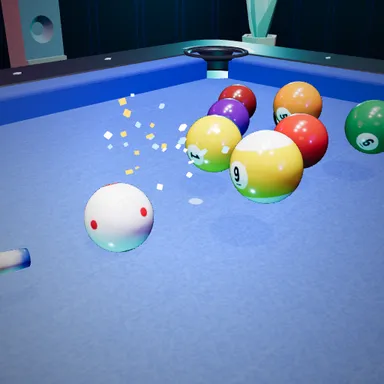
Neon Nine-Ball Club is the late-night version of pool: a black lacquered table with an electric-blue cloth and a cyan underglow, magenta signs buzzing on the walls and a thirty-five second shot clock ticking around your avatar. Nine-ball is a race through the numbers. Only balls one to nine are racked in a diamond, and every shot must strike the lowest-numbered ball on the table first. Make a legal pot of anything and you stay at the table; the moment the nine drops on a legal shot the rack is yours, even on the break or through a sneaky combination. Miss the lowest ball, scratch, fail to send a ball to a rail, or let the clock run out and your opponent gets ball-in-hand to place the cue ball wherever they like. Here the aim guide is shorter than in a casual game, so reading the cut and controlling the cue ball with draw, follow and english really matters. The house CPU defaults to its sharpest level and plans its position by simulating the table, but you can drop it to Medium or Easy, or challenge a friend on the same screen. A strip under the scoreboard always shows which balls are left and highlights the one you must hit, and the 9 going down triggers a slow-motion finish worthy of the neon.
How to play
Always hit the lowest-numbered ball first. Aim with the mouse, press, pull back and release to shoot; on touch drag to aim and pull the power bar. Spin with the cue-ball widget or WASD. Shoot before the clock runs out. Legally pot the 9 to win.
Controls
| Mouse | Aim |
| Drag | Shoot |
| Arrow keys | Aim |
| Space | Shoot |
📺 Play on a TV or projector
- Laptop or PC: connect it to the TV or projector with an HDMI cable (or cast the Chrome tab / mirror your screen), then press the fullscreen button.
- Android TV, Google TV or a TV box: open this site in a browser app on the TV (any Chromium-based TV browser works) and pick a game with the remote's arrows and OK.
- Gamepad: pair a Bluetooth controller (Xbox, PlayStation or a generic one) or plug in a USB one. Stick or D-pad moves, Ⓐ/✕ jumps and selects, Start pauses, View/Select switches fullscreen. In point-and-click games the right stick moves a pointer and RT clicks.
- Phone or tablet: mirror or cast your screen to the TV, or open the site in the TV's own browser.
Difficulty: ★★★☆☆ · Released: 2026-10-07