
About Lava Climb Escape
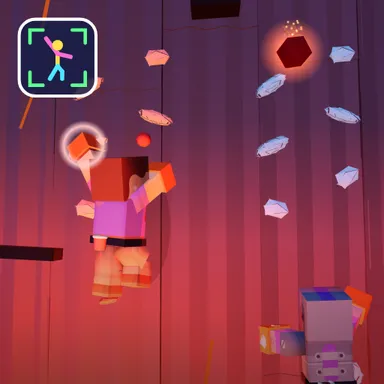
Lava Climb Escape is a race against the bubbling lava at the foot of a smoking volcano, and the only way out is up. Switch on the camera and your blocky Wiggle Look clings to a dark basalt wall with glowing orange lava rising slowly from below. A hold lights up within reach of one of your real hands, so reach up into it, pull, and the next one lights up on the other side. Keep the left and right rhythm going and you stay ahead, but the lava never stops and it gets a little faster every second you climb. Footholds glow near your feet now and then: lift a knee high for a big step that buys you precious space. Lava bombs fly out of the crater and drop down one side of the wall, so lean or step to the other side to dodge them, because a hit knocks you down two holds, closer to the heat. Collect the gems that sparkle on some holds and watch the height meter climb. If the lava catches your toes, your climber does a hot hot hop and the run is over, with your height in metres as the score to beat next time. Earn stars for big climbs and unlock new gloves. Two players can escape side by side on one camera, and online rooms show who stays above the lava longest. Only your movements are used and the picture never leaves your device. No camera? Use the arrow keys, a gamepad, a TV remote or the touch buttons.
How to play
Choose Play with my body and stand two to three metres back so the camera sees your whole body. Hold still for a moment, then reach up with the hand on the side of the glowing hold, and keep alternating left and right to stay above the lava. Lift a knee when a foothold glows. Lean or step away from lava bombs falling on one side. Keys: left and right arrows (or A and D) for each hand, the up arrow (or W) for a knee, hold Q or E to lean. Two players: 2 players, one camera. Online: Quick Match, Create room or Invite.
Controls
| ←→ | Grab |
| ↑WSpace | Climb |
| QE | Lean / balance |
📺 Play on a TV or projector
- Laptop or PC: connect it to the TV or projector with an HDMI cable (or cast the Chrome tab / mirror your screen), then press the fullscreen button.
- Android TV, Google TV or a TV box: open this site in a browser app on the TV (any Chromium-based TV browser works) and pick a game with the remote's arrows and OK.
- Gamepad: pair a Bluetooth controller (Xbox, PlayStation or a generic one) or plug in a USB one. Stick or D-pad moves, Ⓐ/✕ jumps and selects, Start pauses, View/Select switches fullscreen. In point-and-click games the right stick moves a pointer and RT clicks.
- Phone or tablet: mirror or cast your screen to the TV, or open the site in the TV's own browser.
Difficulty: ★★★☆☆ · Released: 2026-10-13