
About Lucky Cloud Blitz
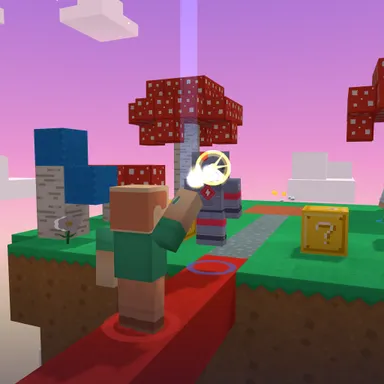
Lucky Cloud Blitz is the silliest island battle in the sky. Pick any of 17 blocky heroes and bring the chaos online: Quick Match, rooms and friend invites start matches with 2 to 4 teams, and CPU fighters fill empty seats. Giant red mushrooms sprout from every island under a candy-pink sunset, and golden question-mark blocks keep popping up everywhere. Smack one open and anything can happen: a fresh stack of wool, a sword or armour upgrade, a pair of fireballs, a golden apple, a pile of gold or emeralds, a burst of super speed, an instant shield around your bed, or a launch that rockets you high into the air. Lucky blocks appear on the centre island, on the little side islands and right on your own base, and they grow back a few seconds after someone breaks them, so the best loot goes to whoever grabs it first. The rules underneath are the classic bed battle. Protect your bed so you can keep respawning, bridge over to the other teams, break their beds and knock the last fighters off into the clouds. You start with a little wool so you can head straight for the nearest lucky block. Thirty bouncy matches pit you against two or three rival bots that get trickier as you go, on ever stranger maps: a plus-shaped causeway cross, a big diamond island with glittering terraces and a night map where glowing lanterns light up the lucky blocks. Win to collect your stars.
How to play
Move with WASD, the arrow keys or the touch stick, Space (▲ on touch) jumps. Left-click or hold J (⚔ on touch) to smash lucky blocks, fight and break beds. Hold right-click, Ctrl+click, Shift or K (▦ on touch) while walking to bridge; on touch, pushing the stick off an edge with wool bridges by itself. F throws fireballs, E eats apples (tap those hotbar slots on touch). The shopkeeper still sells gear: press 1–9, click or tap. Pick one of 17 heroes before a match; for online play, use Quick Match, a room or a friend invite.
Controls
| W A S D | Move |
| JMouse | Hit |
| ShiftKRMB | Build |
| Space | Jump |
| F | Throw |
📺 Play on a TV or projector
- Laptop or PC: connect it to the TV or projector with an HDMI cable (or cast the Chrome tab / mirror your screen), then press the fullscreen button.
- Android TV, Google TV or a TV box: open this site in a browser app on the TV (any Chromium-based TV browser works) and pick a game with the remote's arrows and OK.
- Gamepad: pair a Bluetooth controller (Xbox, PlayStation or a generic one) or plug in a USB one. Stick or D-pad moves, Ⓐ/✕ jumps and selects, Start pauses, View/Select switches fullscreen. In point-and-click games the right stick moves a pointer and RT clicks.
- Phone or tablet: mirror or cast your screen to the TV, or open the site in the TV's own browser.
Difficulty: ★★☆☆☆ · Released: 2026-10-08