
About Paint Blaster
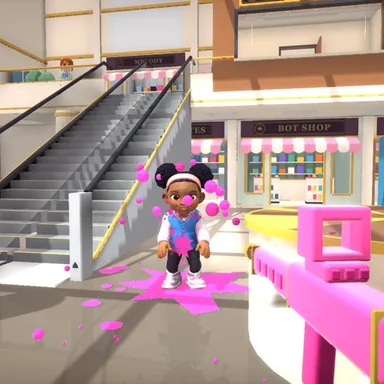
Paint Blaster is a paint shooter you play with your whole body, in first person, in a sunny two-floor shopping mall. You and a teammate in pink take on the blue team for three minutes, and the team with the most splats wins. Nobody gets hurt: a hit just splats paint, and a splatted player sits in a puddle for a moment and comes back at the team's base. Your paint rifle fires by itself the moment an opponent sits in your sights, so the game is all about moving well. Run in place to walk, step to the side to slide, step back to back up, and point an arm to turn: point as far as you want to turn and the view stops right there, with the arm stretched all the way out it keeps turning. Squat to duck behind the shop counters when a bot raises its blaster, jump onto benches, ride the escalator up to the gallery, and use the Manager's Office window as a sniper nest. Raise both hands over your head to switch between the paint rifle, the splat shotgun and the paint sniper, and throw an arm overhand to lob a paint balloon. Easy, Normal and Hard bots, the mall's funny cast with their own voice lines, and online matches of two against two or three against three with players from the Wiggle app and the website in the same room. The camera picture never leaves your device, and keys, the mouse, two thumb sticks on a phone or a gamepad work too.
How to play
Choose Play with my body and stand 2–3 m from the screen so the camera sees you from head to feet, then hold still to start. Run in place to walk, step left or right to slide, step back a little to back up, point an arm to turn and lower it to stop, squat to duck, jump to hop. Both hands over your head switch guns; an overhand throw lobs a paint balloon. Keys: W walks, A and D slide, the mouse or the arrow keys turn, S crouches, Space jumps, Q switches guns, E throws a balloon. Phones: the left stick walks and slides, the right stick turns.
Controls
| W↑ | Move |
| AD | Move |
| ←→Mouse | Aim |
| S↓ | Duck |
| Space | Jump |
| E | Throw |
| Q | Swap |
📺 Play on a TV or projector
- Laptop or PC: connect it to the TV or projector with an HDMI cable (or cast the Chrome tab / mirror your screen), then press the fullscreen button.
- Android TV, Google TV or a TV box: open this site in a browser app on the TV (any Chromium-based TV browser works) and pick a game with the remote's arrows and OK.
- Gamepad: pair a Bluetooth controller (Xbox, PlayStation or a generic one) or plug in a USB one. Stick or D-pad moves, Ⓐ/✕ jumps and selects, Start pauses, View/Select switches fullscreen. In point-and-click games the right stick moves a pointer and RT clicks.
- Phone or tablet: mirror or cast your screen to the TV, or open the site in the TV's own browser.
Difficulty: ★★☆☆☆ · Released: 2026-10-25